During the course of work, not every issue that comes up should become a new task. Some tasks are planned from the very beginning of a project and come with clear progress tracking. However, many situations only appear during day-to-day conversations, such as a small bug that needs fixing, information that needs reconfirmation, or an issue that requires follow-up to avoid being forgotten.
If everything becomes a task, the workflow quickly becomes heavy and fragmented. On the other hand, if teams rely only on chat conversations, important issues can easily get buried in the message flow.
That is why ChaTask separates two concepts: Item and Label Warning.
At first glance, both may seem related to task management, but in reality, they serve two completely different purposes within a team’s workflow.
What is an Item in ChaTask?
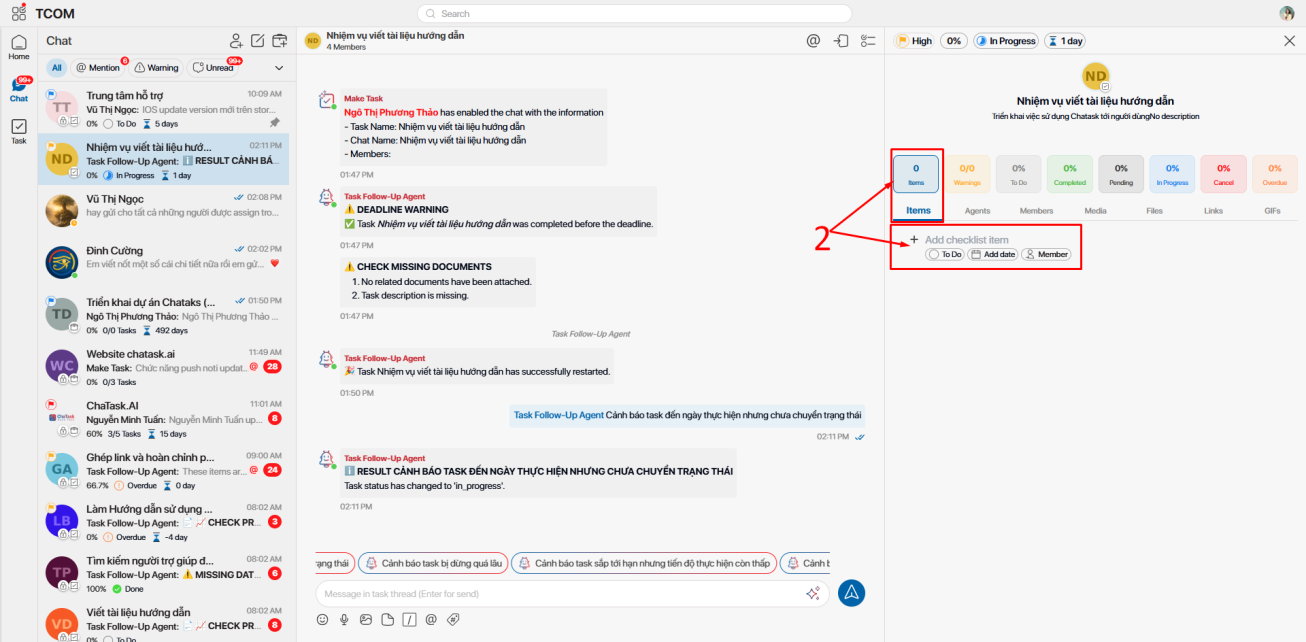
In ChaTask, an Item is understood as a subtask within a main task. These are tasks that are clearly defined from the beginning when the workflow is created.
For example, when a team works on a task called “Launch Product Landing Page,” the task may contain several items such as UI design, SEO content writing, tracking setup, or mobile QA. Each item represents a specific piece of work that must be completed for the main task to be finished.
The important point is that every item comes with structured management information such as assignee, deadline, priority level, and status. This allows teams to track progress in a more organized way instead of relying only on chat communication.
Simply put, items represent work that has already been planned within the workflow.
What is Label Warning?
Unlike items, Label Warning is not designed to manage the main work itself. Instead, it is created to handle issues that arise during the working process.
In real-world collaboration, teams constantly encounter situations such as discovering small bugs, needing to reconfirm information, missing data, or identifying details that require additional follow-up. These issues are usually not large enough to justify creating a separate item, but if they are mentioned only in chat, they can easily be forgotten.
This is where Label Warning becomes useful.
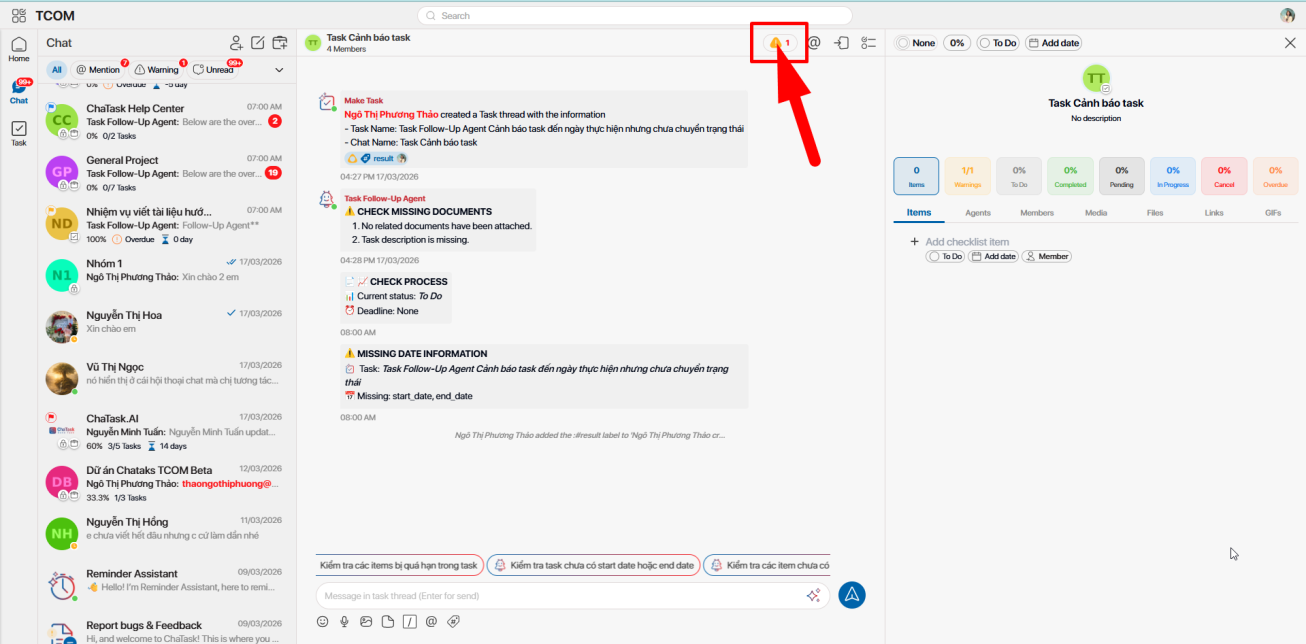
ChaTask allows users to attach a warning directly to any message within a conversation. As soon as a warning is created, that chat message is immediately marked as “requires action.”
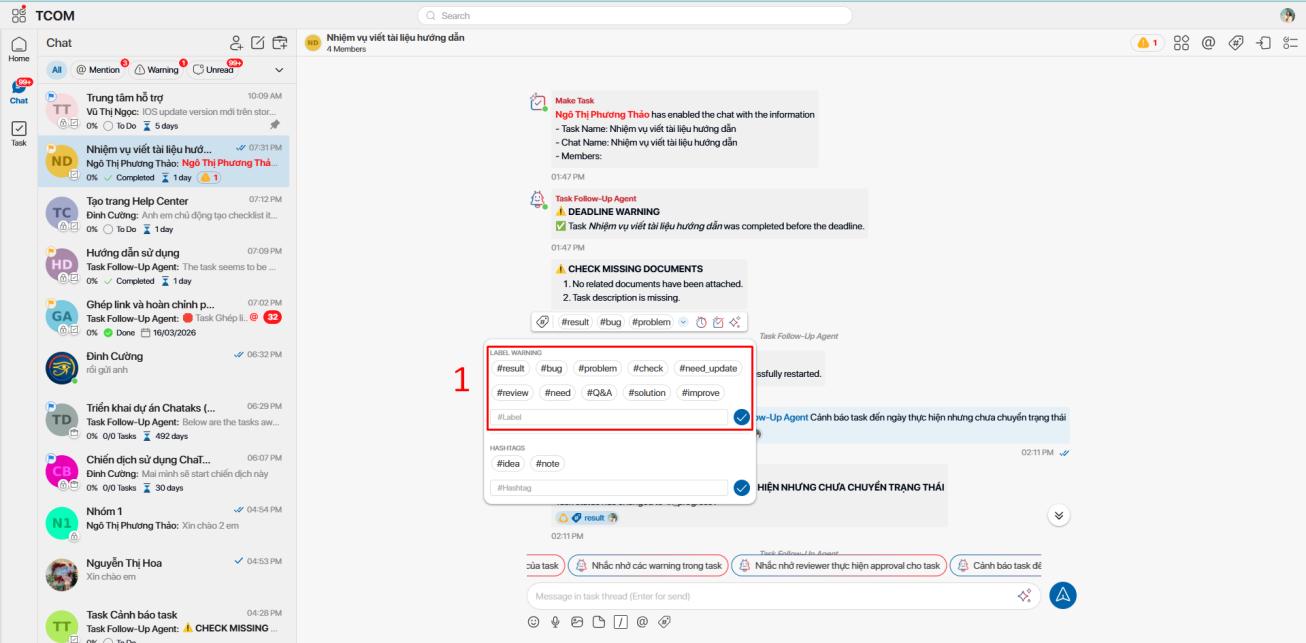
Instead of replying with something like “I’ll check it” or reacting with an emoji to acknowledge the issue, warning labels turn that specific conversation point into a clear follow-up item.
It works like a mini-task embedded directly inside the chat flow.
Why do traditional chat platforms often cause issues to be overlooked?
In many existing collaboration platforms, when issues appear during conversations, people usually handle them by mentioning someone, reacting with emojis, or sending another message to confirm they have seen the information.
The problem is that conversations keep moving.
After a few hours or days, important issues can easily disappear among hundreds of other messages. The sender may not know whether the issue has been resolved, managers struggle to track progress, and recipients may simply forget about it.
This creates a major gap between “communication” and “work follow-up.”
Many teams believe the discussion is finished, while in reality, the issue itself remains unresolved.
How does Label Warning in ChaTask solve this problem?
The difference with ChaTask is that warnings are more than simple reminders.
When a warning is created, the system treats it as an issue that must continue to be tracked until someone confirms it has been resolved. Warnings have their own status, activity history, and can be resolved by authorized users such as assignees or reviewers.
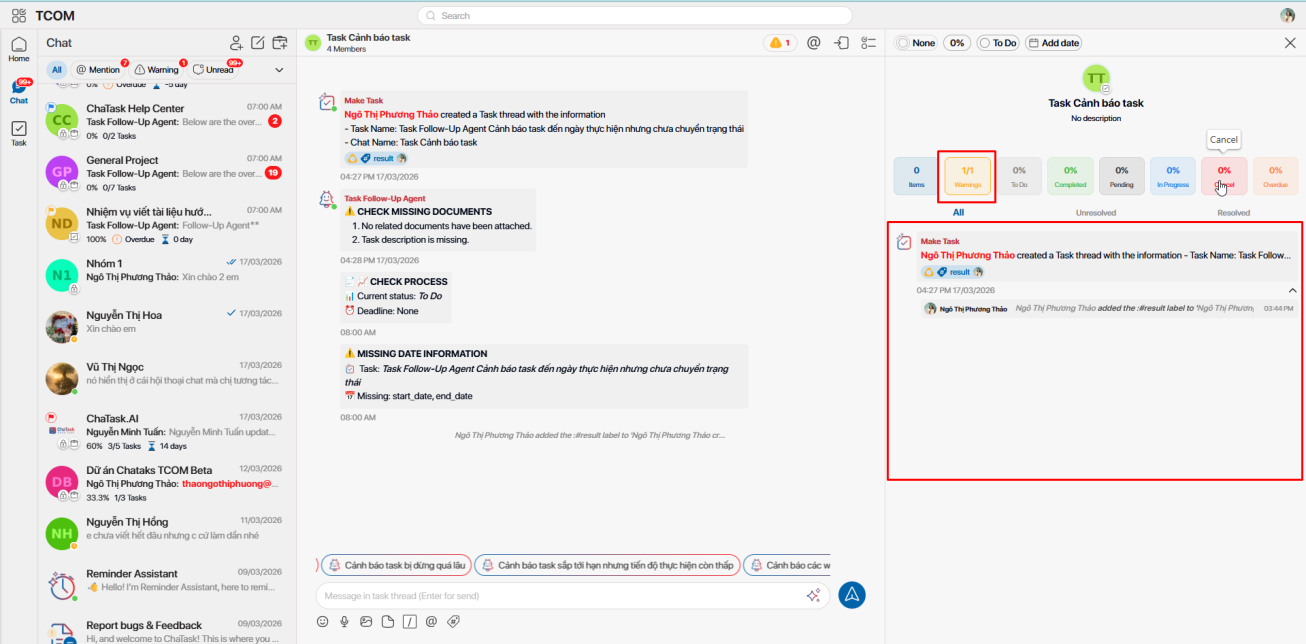
This helps the entire team clearly identify which issues are still pending and which have already been completed.
More importantly, warnings remain attached directly to the original conversation where the issue was raised, so everyone always has full context when reviewing it later. There is no need to search through old chat history or remember where the issue originally appeared.
Task Follow-up Agent ensures warnings are never forgotten
One of the strongest features of Label Warning in ChaTask is its integration with the Task Follow-up Agent.
As soon as a warning is created, the agent begins monitoring it until the warning is moved to the resolved state.
If the issue remains unresolved, the agent automatically posts reminders directly inside the same conversation thread. This reduces reliance on personal memory or managers manually pinging team members for updates.
Instead of repeatedly asking:
“Has this warning been handled yet?”
ChaTask automatically follows up until someone completes the issue.
This creates a major difference between “chatting for communication” and “chatting while still ensuring work gets fully completed.”
Assign warnings directly using @mention + #label
ChaTask also allows users to assign warnings directly to a specific person using a combination of @mention and #label.
For example, simply adding:
@An #warning
immediately links the warning to the responsible person.
This feature is especially useful in larger teams where many issues continuously appear within the same conversation thread. Instead of people guessing “who is supposed to handle this,” assignable warnings make responsibility clear from the start.
Learn more about the flexibility of task coordination offered by the @mention feature in ChaTask.
So when should you use Items, and when should you use Label Warnings?
The easiest way to distinguish them is by looking at the nature of the issue.
If it is a clearly defined task with a specific scope, deadline, and role within the workflow, you should create an Item. These are tasks that need to be managed as independent work units.
On the other hand, if it is simply an issue that arises during conversations and requires follow-up but is not large enough to become its own task, Label Warning is the better choice.
Examples include discovering the wrong logo version, missing tracking events, needing legal review for content, or waiting for final client confirmation. These issues often appear directly within conversations and need quick handling without making the workflow unnecessarily heavy.
To better understand the difference between Item and Label Warning and know when to use each feature, refer to the table below:
| Criteria | Item | Label Warning |
| Nature | An official work unit within a task | An emerging issue that needs follow-up |
| Role in workflow | Used to execute planned work | Used to mark and handle issues |
| When it appears | Usually defined from the beginning | Appears flexibly during work |
| Work scope | Clear scope and deliverables | Usually smaller and follow-up oriented |
| Requires separate structure | Yes | No |
| Display location | Inside the task’s item list | Attached directly to the related chat message |
| Connection to conversation | May not be directly linked to chat | Always tied to the original conversation context |
| Main objective | Complete work execution | Ensure emerging issues are not forgotten |
| Best suited for | Planned work | Issues that arise during conversations |
Items manage work, Label Warnings manage emerging issues
One of the most interesting aspects of ChaTask’s workflow design is that the system does not try to turn everything into a task.
In reality, teams do not only need to manage planned work. They also need to manage the many small issues that continuously appear during collaboration.
Items help organize structured workflows. Label Warnings help ensure no issue gets lost in the flow of conversations.
By combining both, ChaTask becomes more than just a task management tool. It becomes a collaborative system where conversations and task management are tightly connected together.