Have you ever needed a quick answer - whether this month's revenue has increased or decreased compared to last month, which department has the largest workforce, or how far a project has progressed - but ended up opening Excel files, filtering data, building tables, and creating charts manually for hours?
For organizations managing large volumes of operational data, being able to quickly read and understand data is often a real bottleneck, especially when the people who need the information aren't data analysis experts.
Within ChaTask's Wiki - the AI-powered enterprise knowledge hub - there is not only Wiki QA Bot, which specializes in answering text-based questions, but also another AI assistant designed specifically for working with numbers and structured data: Wiki DA Bot.
What is Wiki DA Bot?
Wiki DA Bot (Data Analysis Bot) is an AI-powered data analysis assistant built into ChaTask's Wiki. It helps you analyze numerical and quantitative data stored in your Knowledge Bases - without requiring Excel formulas or complex BI tools.
While Wiki QA Bot helps you answer questions like "What is the process?" or "Where can I find this policy?" using natural language, Wiki DA Bot answers quantitative questions such as "What is this month's revenue?" or "Which department has the most employees?" - also through natural language, without writing a single formula.
Using Wiki DA Bot in Just 2 Steps
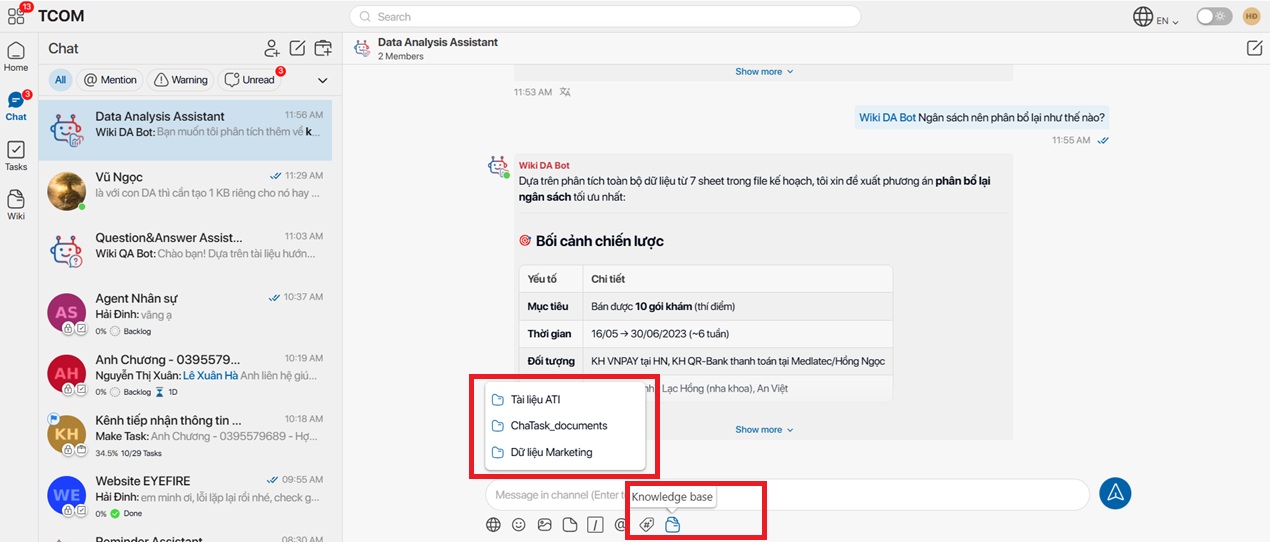
Step 1: Start a conversation with Wiki DA Bot and select a Knowledge Base
Choose the Knowledge Base that contains the data you want to analyze. This can include Excel files, CSV files, or structured datasets that have been uploaded to Wiki.
Step 2: Describe your analysis request in natural language
Simply tell the bot what you want to know, for example:
-
"Analyze monthly revenue."
-
"Count employees by department."
-
"Summarize project progress."
-
"Generate charts from the data in the documents."
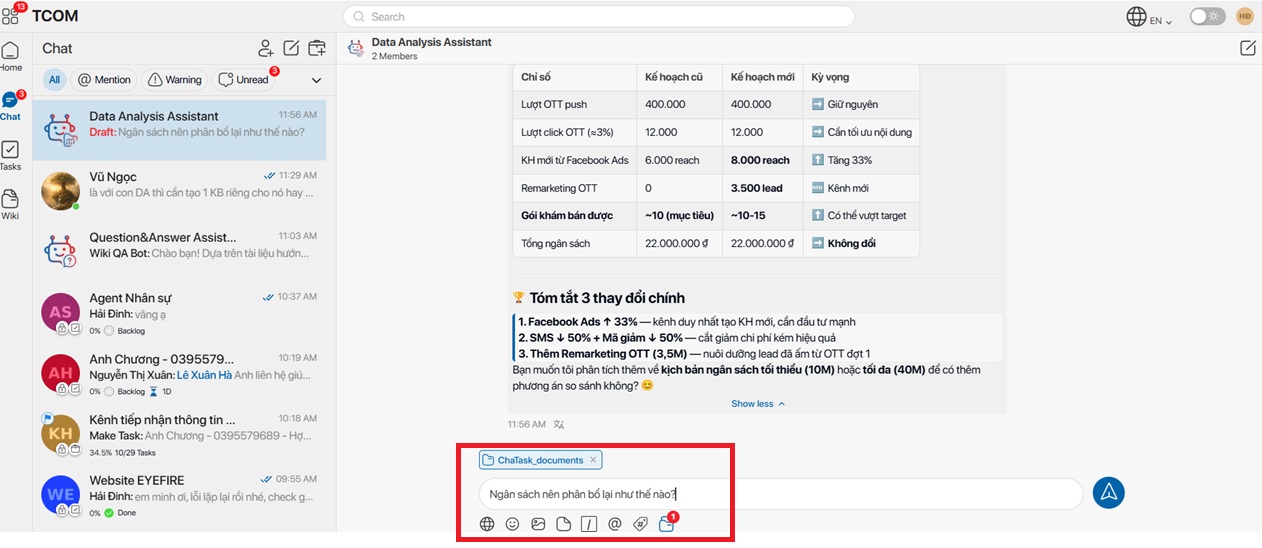
Wiki DA Bot will automatically:
-
Analyze the data stored in the selected Knowledge Base
-
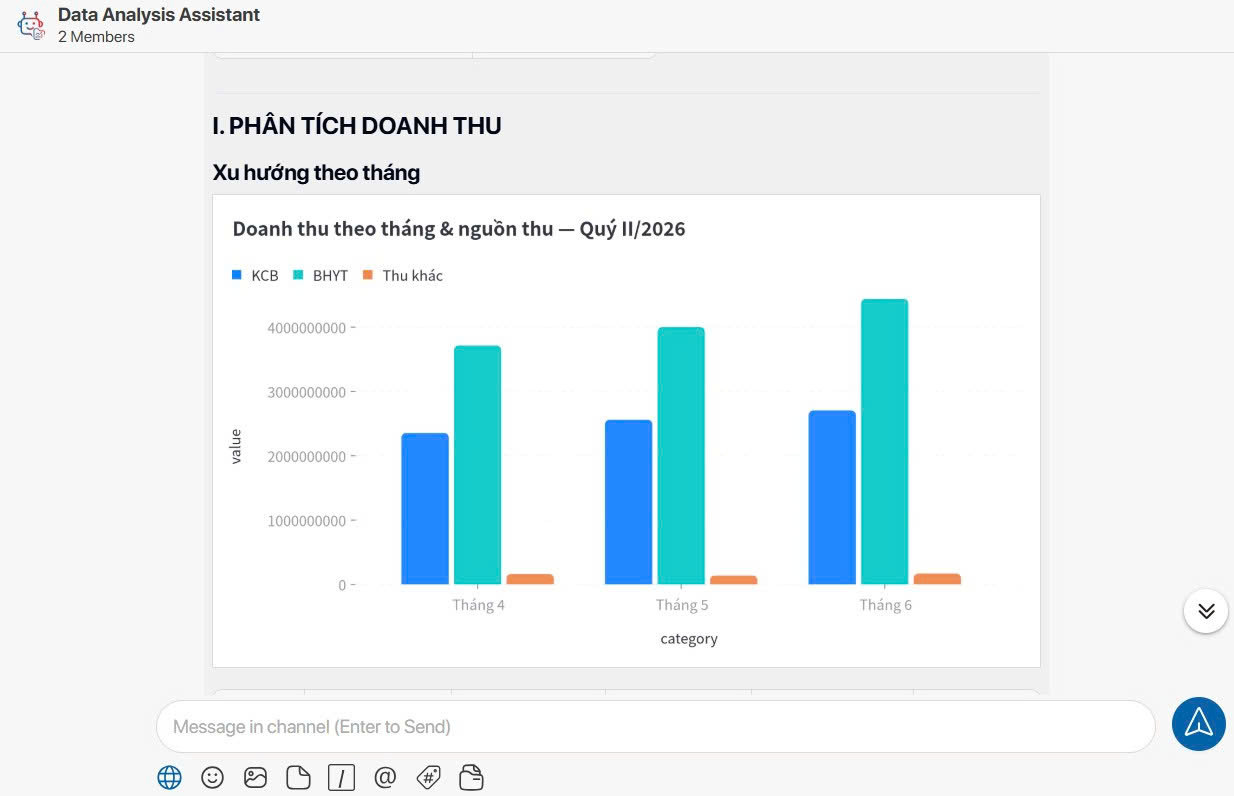
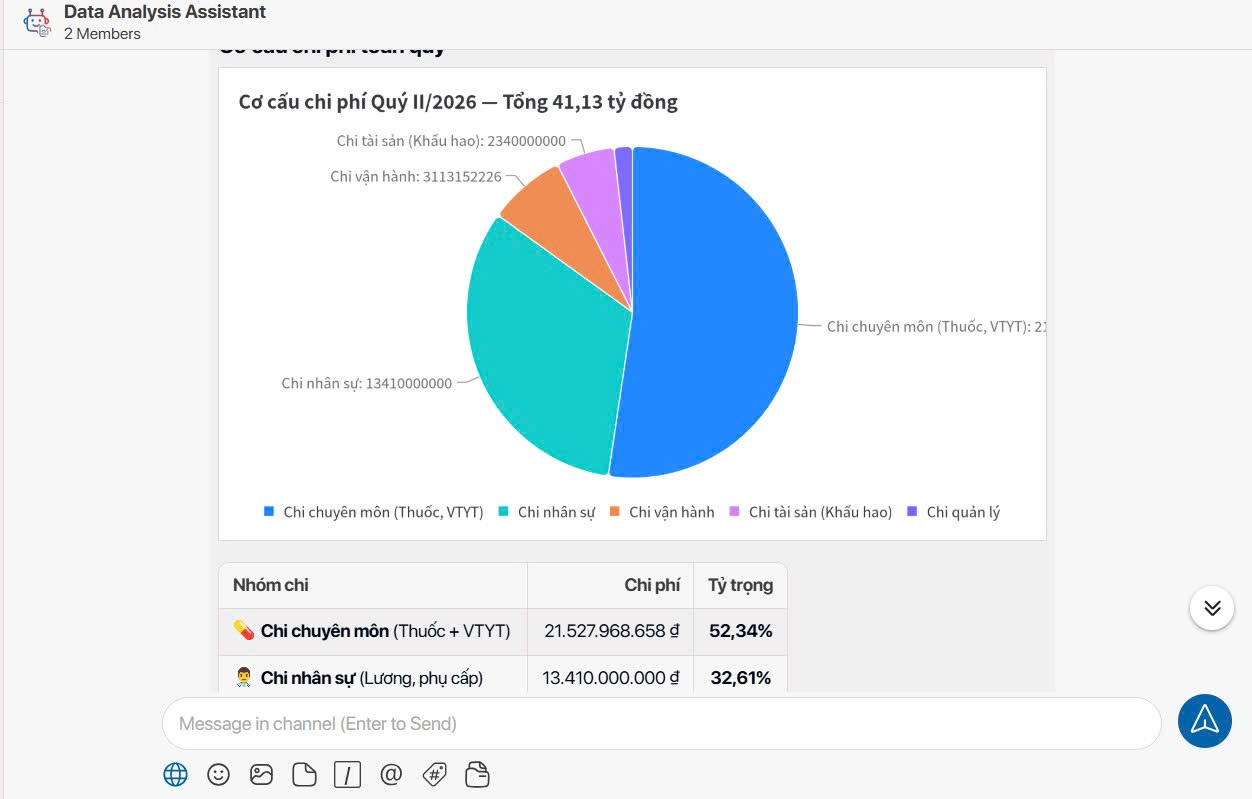
Generate clear, easy-to-read summary tables
-
Visualize the data with charts whenever appropriate
-
Provide observations and actionable insights instead of simply returning raw numbers
The entire process takes place directly within the chat window. You ask a question, the bot analyzes the data, and the answer appears instantly - without leaving ChaTask or opening any additional tools.
Answer from Data Analysis Assistant
Why is Wiki DA Bot Valuable for Businesses?
1. Turn anyone into a data-savvy decision maker
Not everyone in an organization is proficient with Excel or data analytics tools. Wiki DA Bot removes that technical barrier. Anyone who can ask questions in natural language can analyze business data like a professional analyst.
2. Save time on reporting
Instead of manually filtering data, combining spreadsheets, and creating charts whenever a report is needed, Wiki DA Bot completes the entire process within seconds, giving managers and executives immediate visibility into the information they need for decision-making.
3. Deliver insights - not just numbers
Wiki DA Bot goes beyond displaying raw data. It provides meaningful observations that help users understand the story behind the numbers, such as growth trends, declines, and unusual patterns that deserve attention.
4. Keep data connected to business knowledge and workflows
Because Wiki DA Bot operates within ChaTask's Wiki ecosystem, every dataset remains connected to its corresponding Workspace, Project, and Task, ensuring that analytical results never become disconnected from the operational context.
5. Secure analysis with permission-based access control
Wiki DA Bot only analyzes data stored in Knowledge Bases that the user is authorized to access. It fully complies with ChaTask's permission model across Workspaces, Projects, and individual users, ensuring sensitive business data remains protected at all times.
Wiki DA Bot vs. Wiki QA Bot: Which One Should You Use?
These two AI assistants are designed to complement each other within the same Wiki environment.
Use Wiki QA Bot when you need to search for processes, policies, procedures, or other text-based information.
Use Wiki DA Bot when you need to calculate, summarize, analyze, or visualize numerical data.
Together, they transform Wiki from a static document repository into a true enterprise knowledge center capable of answering both qualitative and quantitative questions.
Conclusion
Wiki DA Bot helps organizations bridge the gap between having data and understanding data.
There's no need to wait for analysts to prepare reports or become proficient with BI platforms. Anyone in the organization can ask questions in natural language and instantly receive summary tables, charts, and meaningful insights - all within the familiar ChaTask workspace.
It is another essential building block that enables ChaTask to realize its "Work in Chat" philosophy, where every aspect of work - from communication and execution to data analysis - flows seamlessly within a single conversation.