Google Drive is one of the most widely used tools in modern businesses. Contracts, procedures, templates, meeting minutes, training materials, and project documents can all be uploaded, organized into folders, and shared with colleagues.
Because of this, many organizations assume that once all their documents are stored in Google Drive, they already have a Knowledge Base. However, storing a large number of files does not mean a company has built a true knowledge management system.
Google Drive helps businesses store, edit, organize, and share files in the cloud. A Knowledge Base, on the other hand, is designed so that both people and AI can find, understand, and use the right information when they need it.
Google Drive Solves the Storage Problem
The greatest strength of Google Drive is centralized file storage and collaboration. Users can upload documents, create folders, manage permissions, edit files online, and easily share them with teammates.
With Shared Drives, documents belong to the organization rather than an individual, ensuring that important files remain accessible even if the original owner leaves the company. It is an excellent platform for file storage and collaboration, but its primary focus remains on files.
When people need information, they usually have to remember which folder contains the document, what the file is called, or who created it. If they cannot remember, they search by keywords, open multiple files, and manually determine which one contains the information they need.
This approach works well when there are only a few documents. However, after years of operation, folder structures often become increasingly complicated, multiple versions of the same document begin to coexist, and users spend more time figuring out which information is actually correct.

A Knowledge Base Solves the Knowledge Retrieval Problem
A Knowledge Base does much more than answer the question, "Where is the document?"
It should also help users answer more important questions such as, "Which process is currently in effect?", "What should I do next?", or "Which form should I use for this situation?"
Instead of storing isolated files, a Knowledge Base organizes information by topics, departments, business processes, and real-world use cases. Users can search for procedures, FAQs, policies, or guidance for specific situations without needing to know the document's filename beforehand.
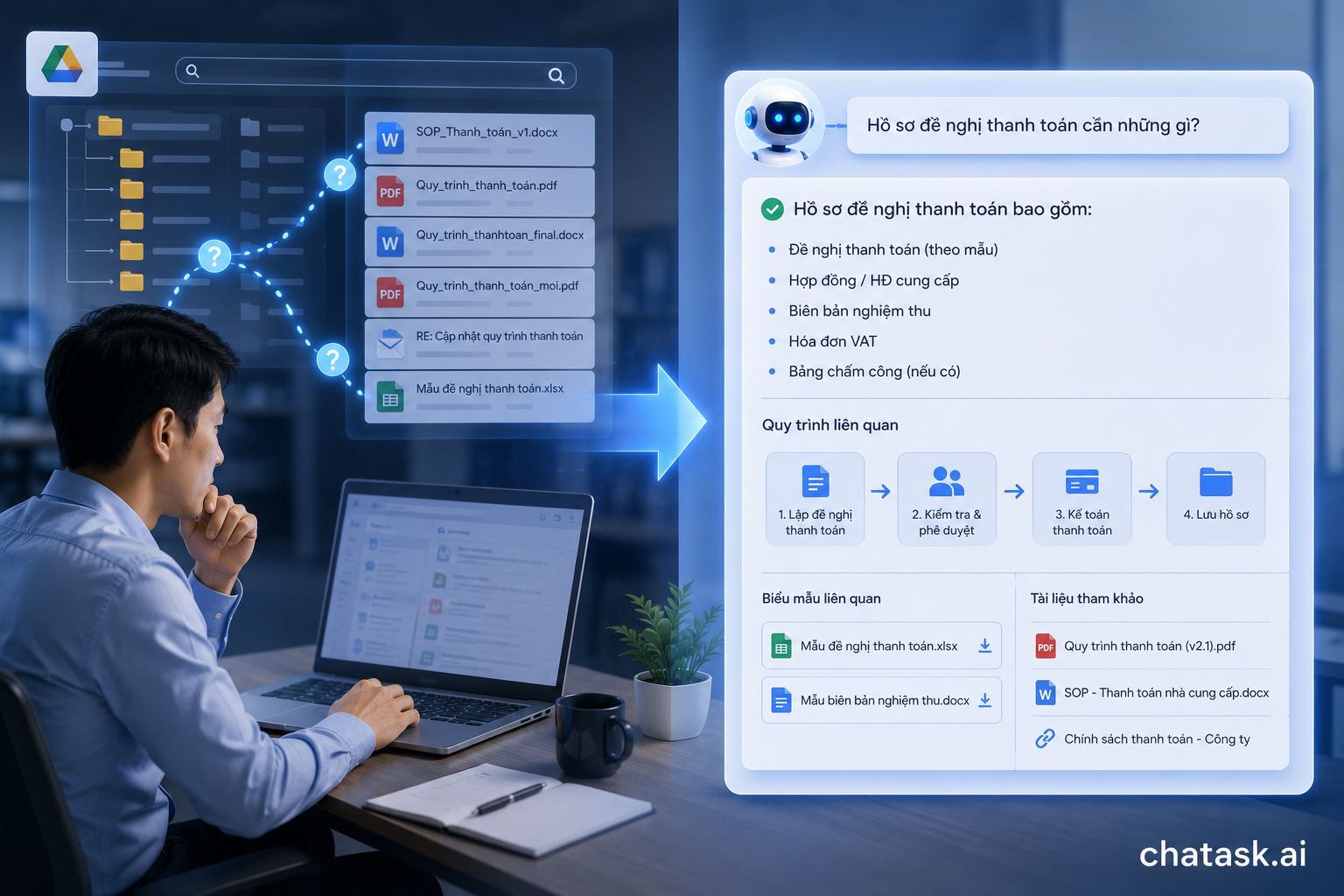
For example, suppose an employee wants to learn about the company's payment request process. In Google Drive, they might need to browse the Finance folder, locate the SOP, verify the latest version, search for the correct template, and then read several emails to understand recent policy changes.
With a Knowledge Base, the employee can simply ask, "What documents are required for a payment request?" The system can gather relevant information, generate a natural-language answer, and point the user to the official reference documents.
The difference is simple. Google Drive leads users to a file. A Knowledge Base leads users to an answer they can actually use.
Having Files Doesn't Mean Having Knowledge
A document only becomes organizational knowledge when the people who need it can easily find it, understand it, and apply it correctly.
If a file is stored in Google Drive but nobody knows it exists, nobody can determine whether it is the latest version, or nobody understands when it should be used, its practical value remains extremely limited.
This explains why many organizations own thousands of documents while employees continue asking the same questions repeatedly. The problem isn't a lack of information - it is that the information hasn't been organized in a way that makes it easy to use.
A new employee may discover five files with nearly identical names such as "Payment Process," "New Payment Process," "Payment Process Final," and "Payment Process Final 2." Yet they still have no idea which document is currently valid or whether it applies to their department.
A Knowledge Base adds the structure that ordinary file storage systems cannot provide. It connects documents with topics, departments, business processes, intended audiences, validity status, and revision history.
A Knowledge Base Is Not Just Google Drive Moved Somewhere Else
One of the most common mistakes organizations make is migrating every existing document into a new platform without changing how the information is organized.
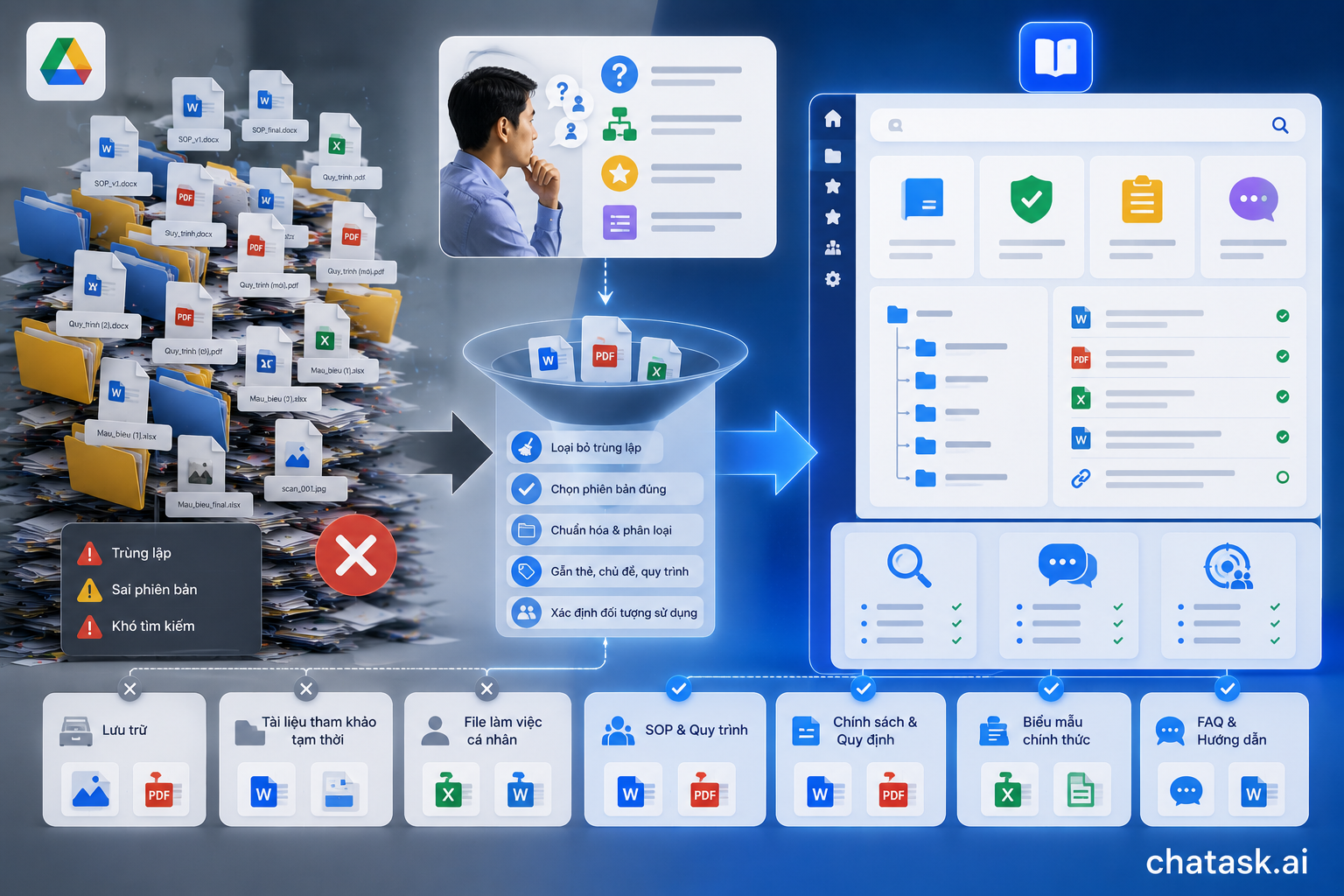
If a company simply copies thousands of files from Google Drive into another repository, problems such as duplicate documents, outdated versions, and poor searchability remain exactly the same.
Building a Knowledge Base should begin by understanding what users actually need to find. Organizations should identify the questions employees ask most often, the business processes that cause confusion, the documents with the highest business value, and the information that needs to be standardized.
Not every file stored in Google Drive deserves a place in a Knowledge Base. Some files exist purely for archival purposes, such as old scanned documents, temporary reference materials, or personal working files.
By contrast, SOPs, company policies, official procedures, standard templates, and frequently asked questions should be organized into structured knowledge resources. The goal is not to move more files into the system, but to help people find the right information more quickly.
A Knowledge Base Requires Knowledge Governance
An effective Knowledge Base cannot simply be created once and left untouched.
Business processes evolve, policies change, employees move into new roles, and documents gradually become outdated.
Organizations need clear ownership over who creates, reviews, approves, and updates each category of knowledge. Important documents should also have well-defined statuses such as Draft, Active, Pending Update, or Obsolete.
Access control is equally important. Employees should easily find the information relevant to their work, but not everyone should have access to HR records, contracts, payroll information, or confidential business documents.
Without proper governance, a Knowledge Base eventually becomes nothing more than another Google Drive. More files continue to accumulate, but nobody knows which information can actually be trusted or who is responsible for maintaining it.
AI Needs a Structured Knowledge Base Even More
Once organizations introduce AI-powered internal search and question-answering systems, the difference between file storage and a Knowledge Base becomes even more obvious.
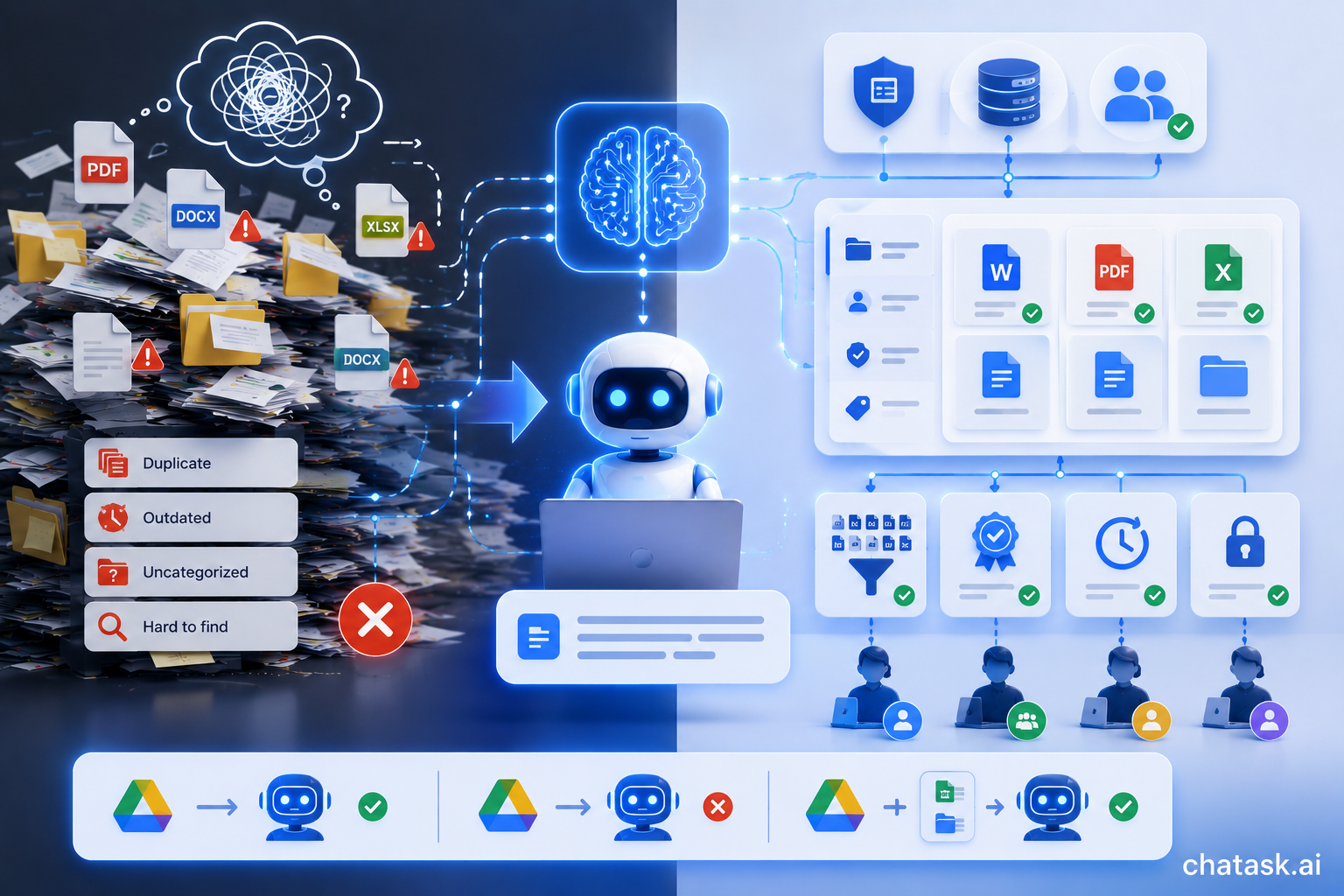
AI cannot generate reliable answers if it is connected to duplicated, outdated, and poorly organized documents.
AI needs to know which sources are official, which documents are currently valid, and which information each user is authorized to access. Without this knowledge, AI may retrieve outdated versions or combine information that no longer belongs together.
This means that simply connecting AI to Google Drive does not automatically transform it into a Knowledge Base. AI-powered search may help users locate files faster, but the quality of the answers still depends on how organizational knowledge is structured and governed.
Even the most advanced AI cannot fix an unstructured knowledge repository. It can only perform well when connected to trustworthy and well-managed knowledge sources.
From Documents to Actionable Answers
ChaTask Wiki is designed to serve as an enterprise knowledge hub where documents, SOPs, and other information sources are organized for AI-powered search and question answering. Within the ChaTask ecosystem, Wiki does not exist as a standalone repository - it works alongside Chat, Tasks, and AI Agents inside a unified AI Workspace.
The Wiki Assistant helps organizations build and maintain their Knowledge Base by importing documents, web pages, and other information sources. Instead of forcing users to search through countless folders, the Wiki QA Bot retrieves relevant information, synthesizes content from multiple sources, and provides natural-language answers along with references.
This allows the Knowledge Base to become part of everyday work rather than simply a document archive. Employees not only find the right document, but also understand the process, identify the correct forms, and continue working without switching between multiple applications.
For example, when an employee asks about the company's leave request process, they can immediately receive information about eligibility requirements, approval steps, responsible managers, and the appropriate forms. From there, they can continue by creating tasks, submitting requests, or tracking progress - all within the same workspace.
Google Drive and a Knowledge Base Complement Each Other
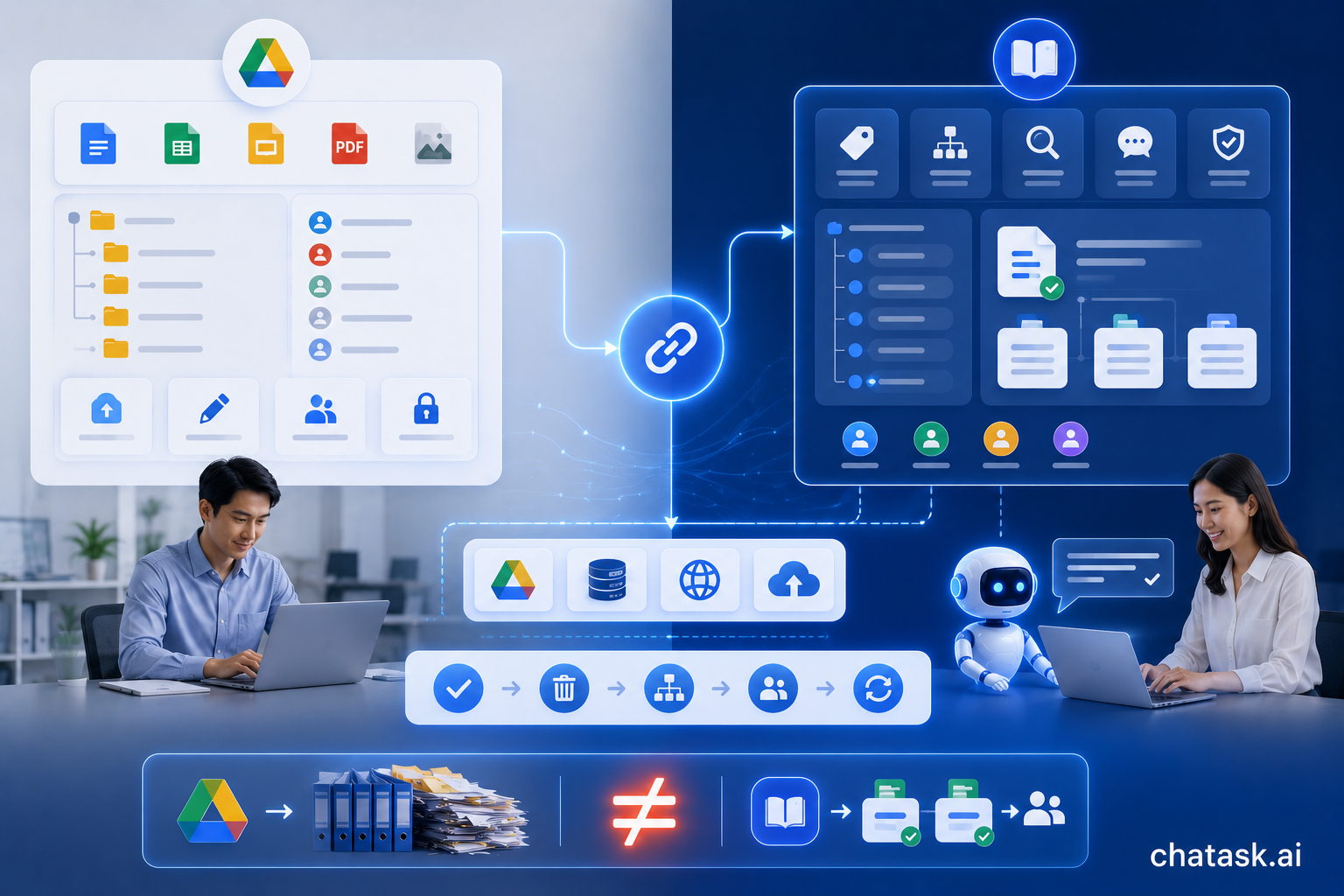
Saying that a Knowledge Base is not Google Drive does not mean businesses should choose one over the other. They solve different problems and work best together.
Google Drive is designed for creating, editing, storing, and sharing files. A Knowledge Base is designed for organizing, standardizing, searching, and applying knowledge during daily work.
Google Drive can absolutely serve as one of the data sources for a Knowledge Base. However, transforming files into usable organizational knowledge still requires identifying official documents, removing obsolete versions, adding structure, managing permissions, and continuously maintaining the information.
The issue isn't that organizations use Google Drive. The problem begins when they expect a file storage platform to perform the role of a knowledge management system.
When Does a Business Really Need a Knowledge Base?
If employees frequently ask each other where documents are located, that is the first warning sign.
If they can find the file but still cannot determine which version is correct, the organization has already moved beyond a storage problem and entered the realm of knowledge management.
The need becomes even more obvious when the same questions are repeatedly asked, onboarding new employees takes too long, or critical business knowledge exists only in the minds of a few experienced staff members.
At that point, businesses no longer need just another place to store files. They need a system that preserves, validates, and continuously reuses organizational knowledge.
A Knowledge Base also becomes essential when organizations plan to deploy internal AI assistants. Without well-structured knowledge, introducing AI too early may simply produce faster - but not necessarily more accurate - answers.
Conclusion
Google Drive helps businesses store and share documents, while a Knowledge Base transforms those documents into knowledge that people can easily search, understand, and apply. One focuses on files; the other focuses on answers and how information is used in daily work.
Organizations do not build a Knowledge Base simply by uploading more documents. They must identify trusted information sources, standardize content, manage document versions, define access permissions, and continuously keep organizational knowledge up to date.
When built correctly, a Knowledge Base becomes much more than a digital document library. It enables employees to find the right information quickly, allows AI to provide more reliable answers, and transforms organizational knowledge into meaningful action.