In many small and medium-sized businesses, the procurement process does not really exist within a single system.
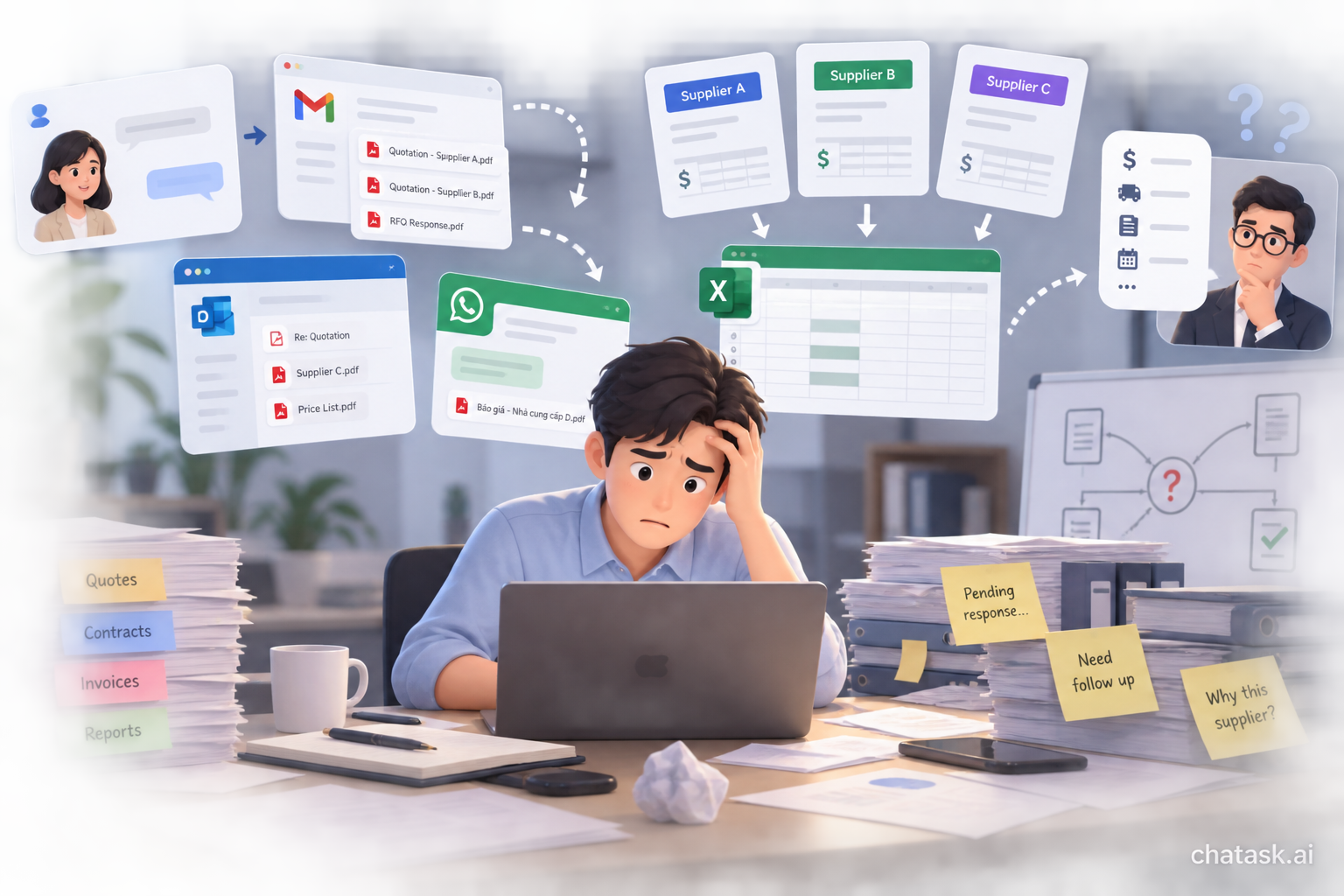
Purchase requests are discussed via chat. Quotations are sent by email. The person in charge downloads the files, enters the data into Excel for comparison, and then sends the results to a manager for approval. Contracts, invoices, and acceptance records are often stored in yet another folder.
When a business needs to check why one supplier was selected over another, who approved the decision, or what the quoted price was at that time, employees often have to trace back through multiple emails, files, and conversations.
AI Agents can change the way this process operates. Instead of supporting only a few isolated tasks, an Agent can follow the entire lifecycle of a procurement request: from receiving the initial request and collecting and analyzing quotations to approval and storing the final decision record.
Why Are Procurement Processes Often Difficult to Control?
The problem with manual procurement processes is not necessarily that businesses lack tools. Email, Excel, chat applications, and document storage systems can each handle part of the work effectively.
The difficulty arises when these parts do not belong to the same workflow.
A procurement request may begin with a conversation between an employee and a manager. The person in charge then contacts multiple suppliers, receives different quotations, and manually consolidates the information in Excel.
When the request reaches the approval stage, the approver may need additional information: Why was Supplier A selected? How much cheaper is Supplier B? What are the payment terms? Does the delivery schedule meet the requirement?
Some common bottlenecks include:
-
Quotations are scattered across different emails, conversations, and folders.
-
Employees have to manually re-enter quotation data into Excel for comparison.
-
Evaluation criteria are inconsistent across different procurement requests.
-
Approvers lack context and have to ask the requester for additional information.
-
Requests that have not received a response can easily be overlooked.
-
The reasons for selecting or rejecting a supplier are not fully recorded.
-
Contracts, invoices, acceptance records, and approval decisions are difficult to connect into a complete procurement record.
As a result, businesses may use many different tools while still relying heavily on one person to track and connect the entire process.
How Can an AI Agent Change the Procurement Process?
Unlike a chatbot that responds to one request at a time, an AI Agent can be given a goal and follow multiple consecutive steps within a process.
In ChaTask, a procurement request can be managed within a Task Thread. Chat, Task, Wiki, and AI Agents operate within the same workspace, allowing the Agent to reuse the context created throughout the work process.
For example, suppose a business needs to purchase a generator for Project A.
Instead of handling each step with a separate tool, the person in charge can start with a Task Thread: “Purchase a Generator - Project A”
From there, the Procurement Agent can support the process from beginning to end.
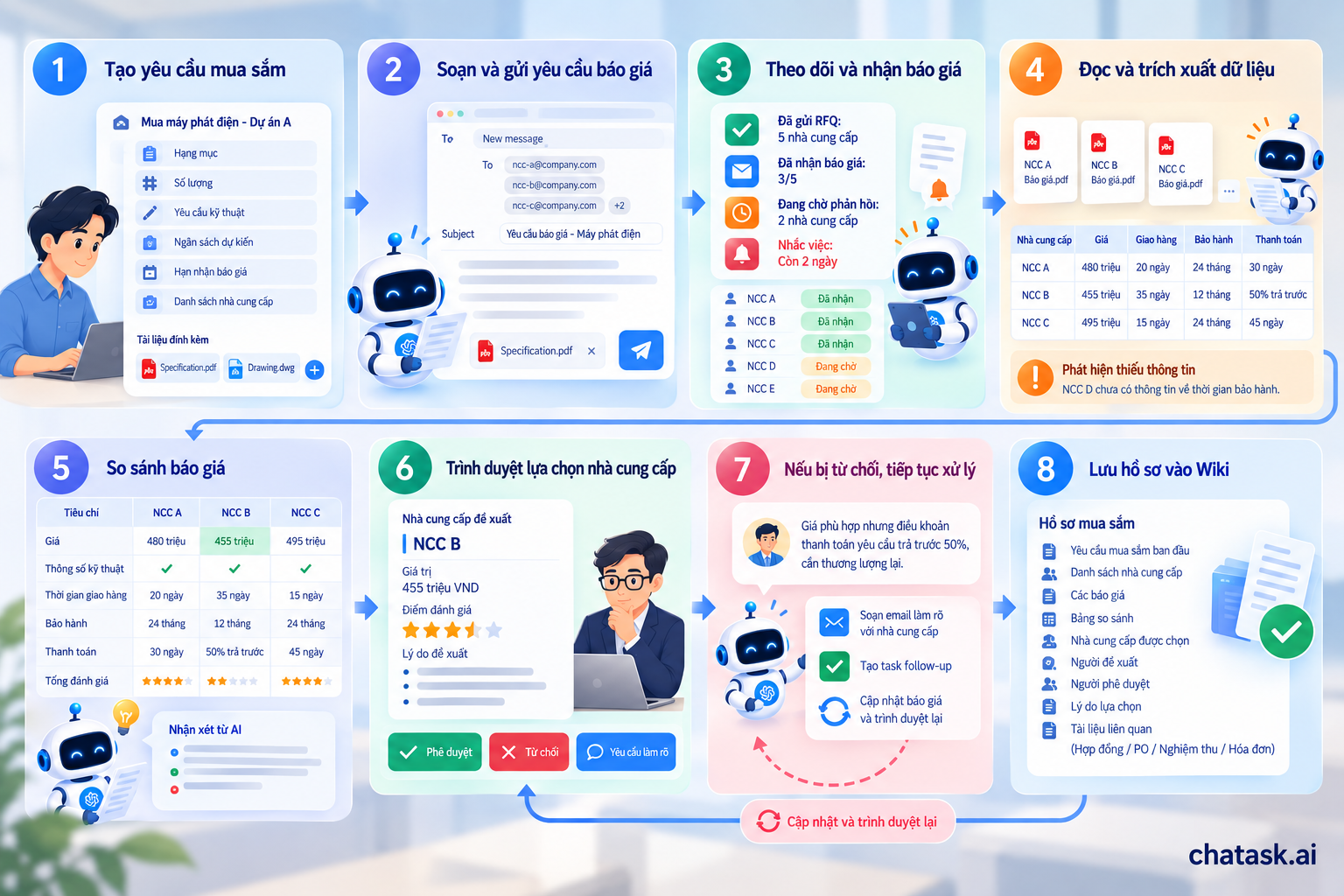
Step 1: Create a Procurement Request
The person in charge enters basic information such as the item to be purchased, quantity, technical requirements, estimated budget, quotation deadline, and supplier list.
Related documents, such as specifications, drawings, or technical requirements, can also be added directly to the Task Thread.
This information becomes the shared context for the entire process that follows. Users do not need to re-enter the technical requirements every time they move to a new step.
Step 2: The AI Agent Prepares the Request for Quotation
Based on the information already available, the user can simply ask:
“Draft an RFQ email for these suppliers.”
The Agent reads the procurement request information and prepares an appropriate RFQ, including the item, quantity, technical requirements, quotation deadline, and required attachments.
The business can also define in advance the information that suppliers must include, such as:
-
Unit price and total value;
-
Taxes;
-
Delivery time;
-
Warranty period;
-
Payment terms;
-
Quotation validity;
-
Catalogue or technical documentation.
The person in charge still reviews the content before it is sent. AI handles the preparation and information consolidation, while the user retains control over the final confirmation.
Step 3: Track RFQs and Supplier Responses
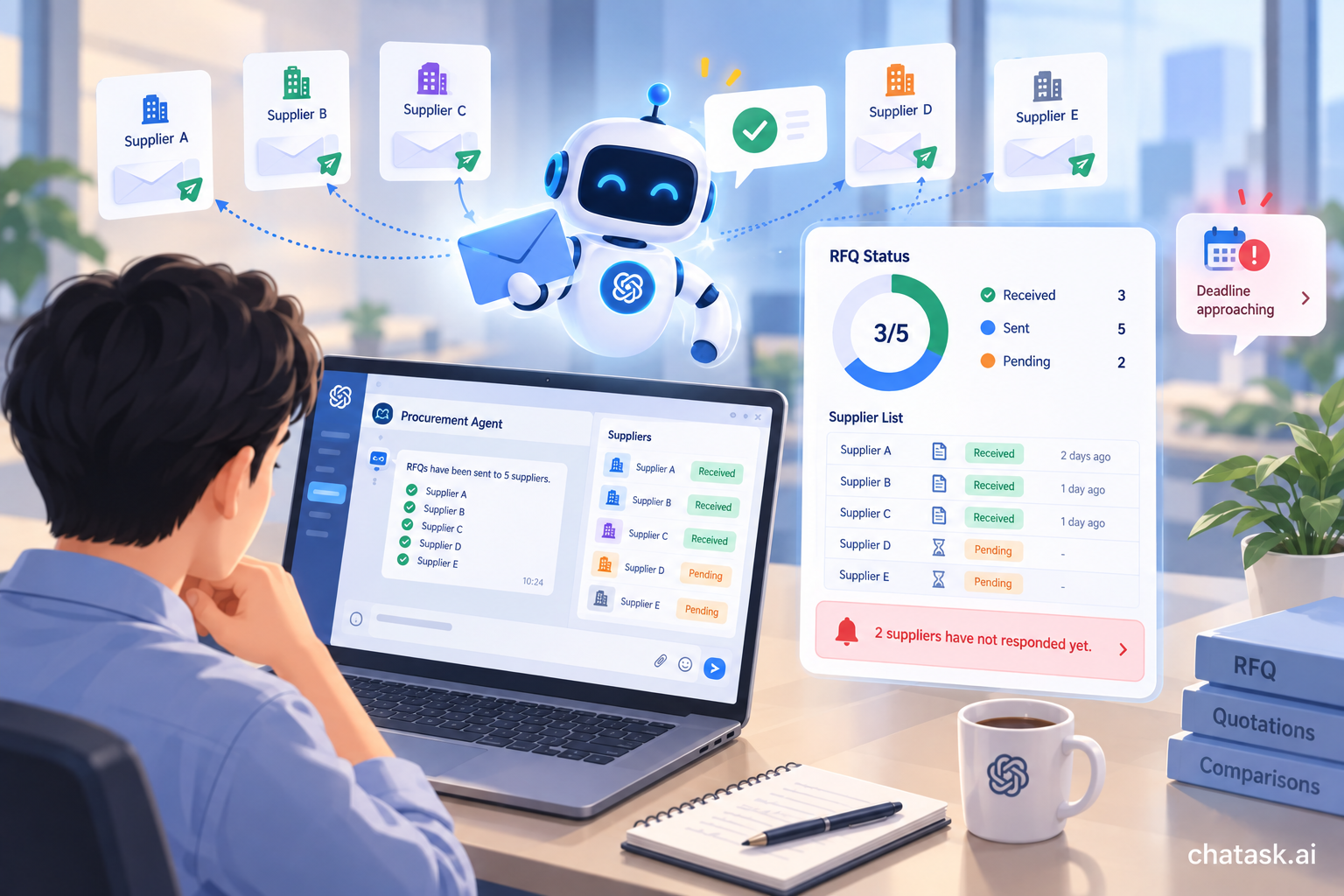
After the user confirms, the Agent can perform or assist with sending RFQs through connected systems.
The status can be updated directly in the Task Thread, for example:
RFQs sent: 5 suppliers
Quotations received: 3/5
Awaiting responses: 2 suppliers
Instead of continuously checking email, the person in charge can monitor the progress of the procurement request directly within the workflow.
If the deadline is approaching and some suppliers have not yet responded, the Agent can also issue a warning or create a reminder for the person in charge.
Step 4: Read and Extract Data from Quotations
When quotations are added to the process, the AI Agent can read the documents and extract the required data fields.
For example:
|
Supplier |
Price |
Delivery |
Warranty |
Payment Terms |
|
Supplier A |
VND 480 million |
20 days |
24 months |
30 days |
|
Supplier B |
VND 455 million |
35 days |
12 months |
50% upfront |
|
Supplier C |
VND 495 million |
15 days |
24 months |
45 days |
The important point is not simply that the table can be created faster.
The data is extracted directly from the original quotation documents, reducing manual re-entry and helping prevent situations where a figure in Excel differs from the original document.
If a quotation is missing important information, such as delivery time or warranty terms, the Agent can flag the missing field for the person in charge to review.
Step 5: Compare Quotations Using the Same Set of Criteria
The lowest price is not necessarily the most suitable option.
One supplier may be 5% cheaper but require three additional weeks for delivery. Another supplier may charge more but offer a longer warranty or better payment terms.
The Agent can consolidate quotations according to a set of criteria defined by the business, such as:
Price → Technical Specifications → Delivery Time → Warranty → Payment Terms → Supplier Documentation
This gives the person in charge a standardized set of data for evaluation instead of requiring them to open individual PDFs and compare each line manually.
AI can help identify differences and consolidate information, but the final supplier selection remains with the authorized decision-maker.
Step 6: Bring Approval Requests Directly into the Task Thread
After the evaluation, the person in charge selects the proposed supplier and submits the request for approval.
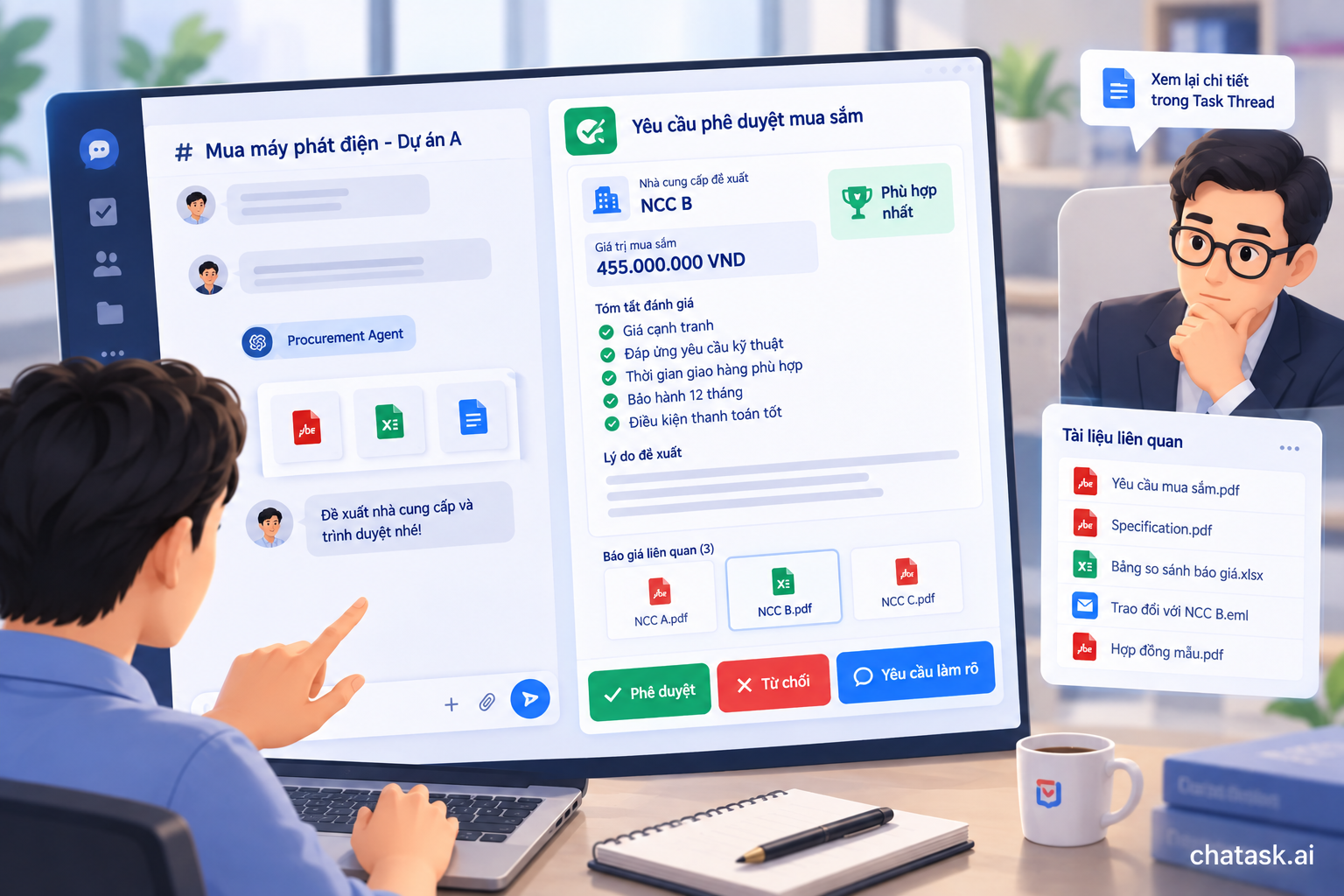
Instead of sending another email with multiple attachments, ChaTask can display an Approval Widget directly within the conversation.
The approver can see key information such as the proposed supplier, procurement value, evaluation criteria, related quotations, and the reason for the recommendation.
From there, the approver can choose: Approve | Reject | Request Clarification
If additional review is required, the approver can refer back to the Task Thread and related documents instead of asking the person in charge to compile the entire record again.
Step 7: If the Request Is Rejected, the Process Does Not End There
In many automated workflows, Rejected is often treated as an end state.
In a procurement process, however, rejection may simply trigger another processing cycle.
For example, an approver may reject a request because:
“The price is acceptable, but the payment terms require a 50% upfront payment. These terms need to be renegotiated.”
The Agent can record this reason and then suggest the next action, such as drafting an email asking the supplier to revise the payment terms or creating a follow-up task for the person in charge.
When the supplier submits a revised quotation, the Agent can update the data and the request can be submitted for approval again.
As a result, the entire history:
Proposal → Rejection → Clarification → Updated Quotation → Resubmission → Approval
remains within the same workflow instead of being scattered across multiple emails.
Step 8: Create a Searchable Procurement Record
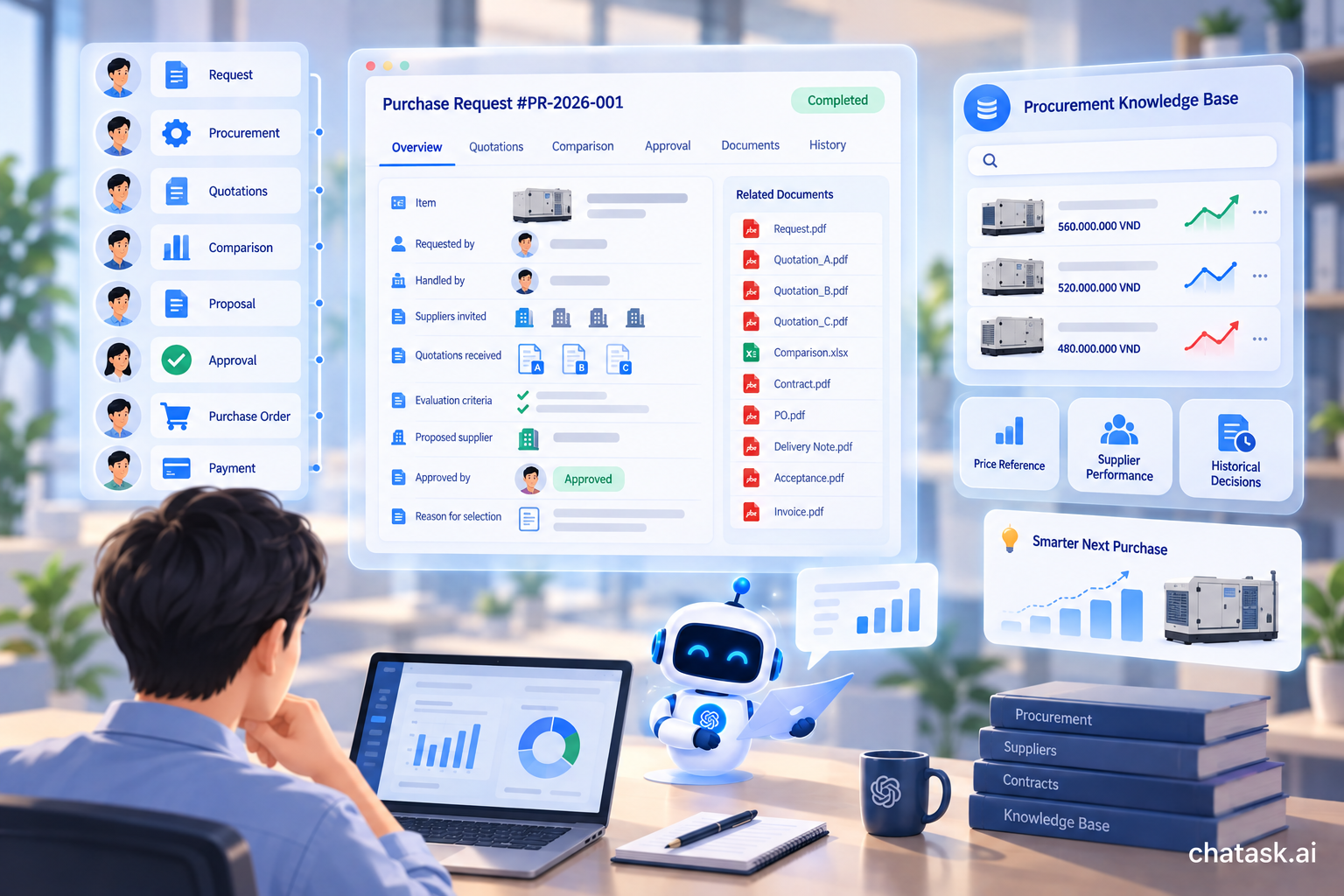
Once the request is approved, important information from the procurement process can be stored in the company Wiki using a standardized structure.
The record can include the original procurement request, supplier list, quotations, comparison table, selected supplier, requester, approver, and reason for selection.
If someone later asks:
“Which supplier did we purchase this equipment from last time?”
or:
“Why did we choose Supplier A instead of Supplier B last quarter?”
the business can refer to historical data rather than relying on the memory of the person who handled the procurement process.
From Procurement Approval to Payment Document Control
The process does not necessarily end once a supplier has been selected.
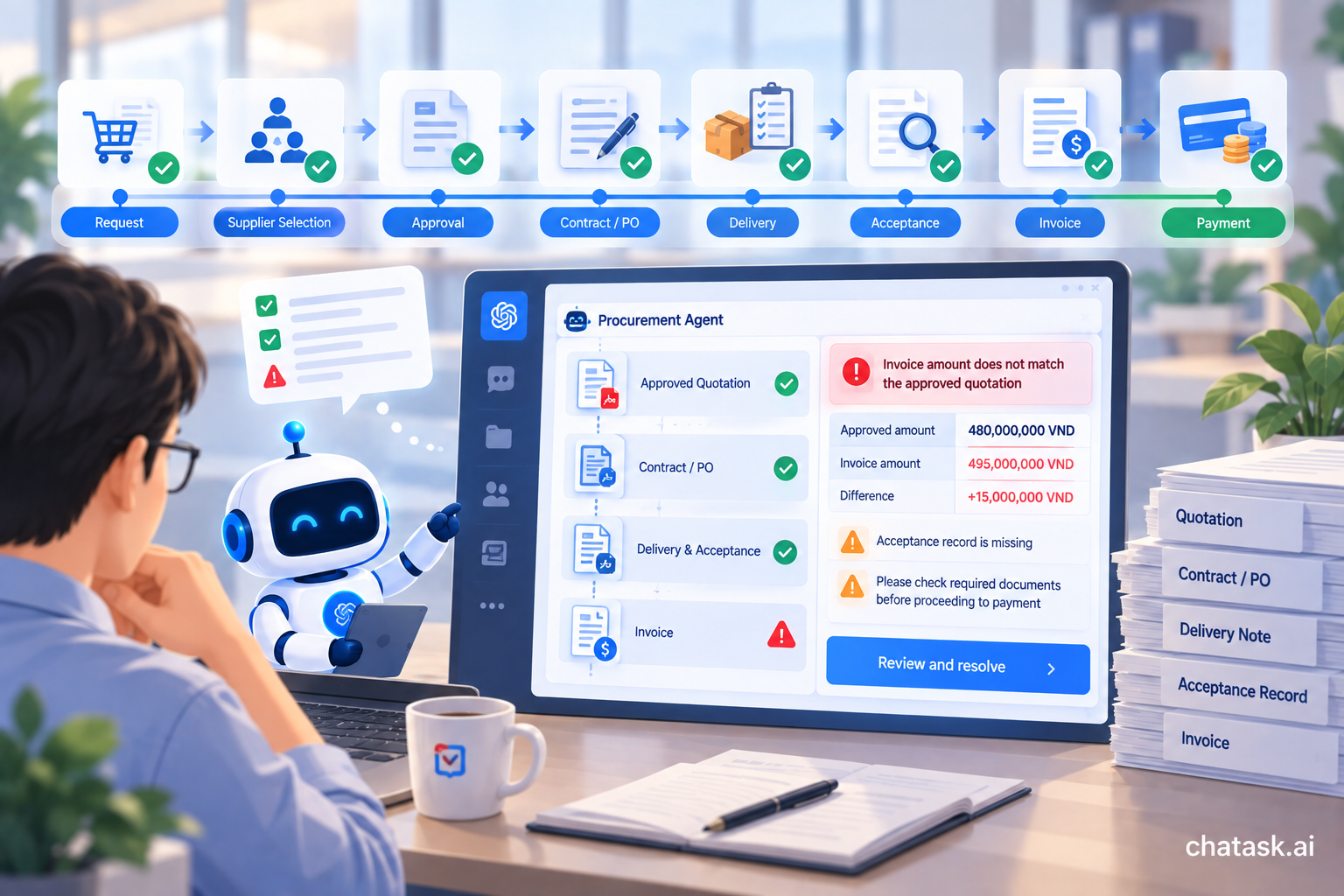
Contracts, purchase orders, delivery records, acceptance records, and invoices still need to be processed. This is also where discrepancies between documents can occur.
An AI Agent can help check the documentation before the process moves to payment, for example by comparing:
Approved Quotation → Contract/PO → Acceptance Record → Invoice
If the invoice value differs from the approved amount, an acceptance record is missing, or a required document has not yet been provided, the Agent can issue a warning so that the person in charge can review the issue before proceeding.
In this way, the Procurement Agent can support more than just purchasing. It can connect the process from procurement request → supplier approval → document completion → payment request.
How Is an AI Agent Different from a Traditional Automated Workflow?
Traditional workflows usually operate based on predefined conditions: If A happens → perform B.
This approach works well for clearly structured steps, but it becomes more difficult when the input consists of emails, PDFs, quotations, or natural-language conversations.
AI Agents add the ability to read and understand this type of information.
An Agent can read quotations, identify data fields, compare terms, detect missing information, summarize documents, and use the results to support the next step in the process.
The two approaches are not mutually exclusive. A workflow determines where the process should go next, while an AI Agent helps process the information and work within each step.
Why Is an AI Workspace Suitable for This Use Case?
If an Agent exists only as a standalone chatbot, businesses still need to move data from email, task management systems, and document repositories to the Agent whenever they need assistance.
In ChaTask, Chat - Task - Wiki - AI Agents operate within the same workspace.
A request that begins in Chat can become a Task. An Agent can help process information within the Task Thread. Approval can take place directly within the workflow. Once completed, the resulting records can become data in the Wiki.
This helps reduce the number of times users need to transfer data between tools and keeps the context of a process more continuous from beginning to end.
The Biggest Value Is Not Just Time Savings
The most visible benefit of procurement automation is reducing the time spent drafting emails, entering data, and creating comparison tables.
For businesses, however, the long-term value also lies in the ability to standardize processes and maintain a complete audit trail.
For every procurement request, the business can answer:
Who requested it? → Who handled it? → Which quotations were received? → What criteria were used for comparison? → Who made the recommendation? → Who approved it? → Why was this supplier selected?
As the number of transactions increases, this information gradually becomes a procurement knowledge base for the business.
The company can use this historical data to reference previous prices, evaluate suppliers, review past decisions, and prepare more effectively for future procurement activities.
Humans Still Make the Decisions
Automating procurement processes with AI Agents does not mean handing purchasing decisions over to AI.
AI is well suited to time-consuming but standardizable tasks such as reading documents, extracting data, comparing quotations, consolidating information, tracking status, and sending reminders.
The person in charge still defines the requirement and evaluates the proposal. The authorized decision-maker still decides whether to approve or reject it.
The role of the AI Agent is to help those people have the right information, the right context, and the right timing to make their decisions.
From One Procurement Process to Multiple Operational Workflows
Procurement is a suitable starting point for businesses adopting AI Agents because the process involves many repetitive steps, numerous documents that need to be checked, and relatively clear approval points.
Once this model is working, a similar approach can be extended to document processing, recruitment, HR, contracts, payment requests, and other internal workflows.
Instead of building another standalone tool for each business function, companies can move toward an AI Workspace, where people and AI Agents work together across Chat, Task, and enterprise data.
With ChaTask, the goal is not simply to help AI answer questions faster, but to enable AI to actively participate in getting work done - from the moment a request appears until the work is processed and stored as reusable organizational knowledge.