1. What is Wiki?
Wiki is the enterprise knowledge hub on ChaTask that centralizes all documents, processes, guidelines, SOPs, templates, and other important information in one place.
More than just a document repository, Wiki is directly connected to Workspaces, Projects, Tasks, and AI Agents, allowing users to easily search, share, and leverage organizational knowledge while they work.
Wiki helps you
-
Build a centralized enterprise knowledge base.
-
Search for information using AI with natural language.
-
Organize documents by Knowledge Base (KB).
-
Connect knowledge with day-to-day work.
-
Enable AI Agents to understand internal data and provide more accurate assistance.
-
Manage access permissions and data security by Workspace and user.
Permissions
Not all users have access to every Knowledge Base. Access permissions are managed at both the Workspace level and the Knowledge Base level.
Depending on the permissions granted, users can:
-
View Knowledge Bases
-
Upload documents
-
Edit content
-
Manage Knowledge Bases
-
Ask questions using the Wiki QA Bot
-
Analyze data using the Wiki DA Bot
Users can only search and access information from the Knowledge Bases they have permission to use.
2. Create a Knowledge Base (KB)
A Knowledge Base (KB) is a collection of documents that belong to the same topic or business domain, for example:
-
HR procedures
-
Manufacturing SOPs
-
Internal policies
-
Training materials
-
User guides
ChaTask supports two methods for creating a Knowledge Base.
Method 1: Create a Knowledge Base from the Wiki menu
Step 1
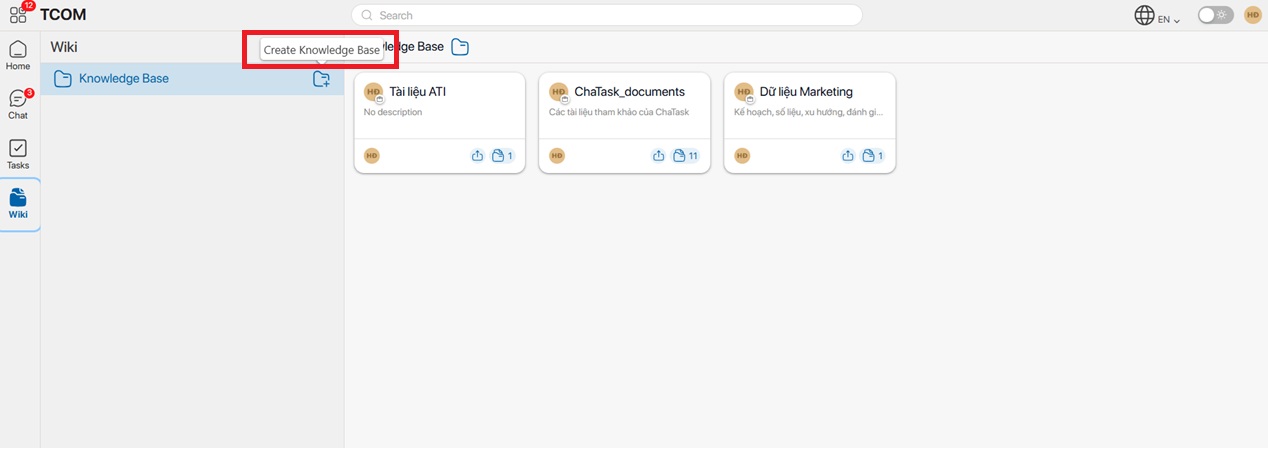
In your ChaTask Workspace, select Wiki from the menu bar.
Then click the Create Knowledge Base icon to create a new KB.
Step 2
The Create Knowledge Base window will appear.
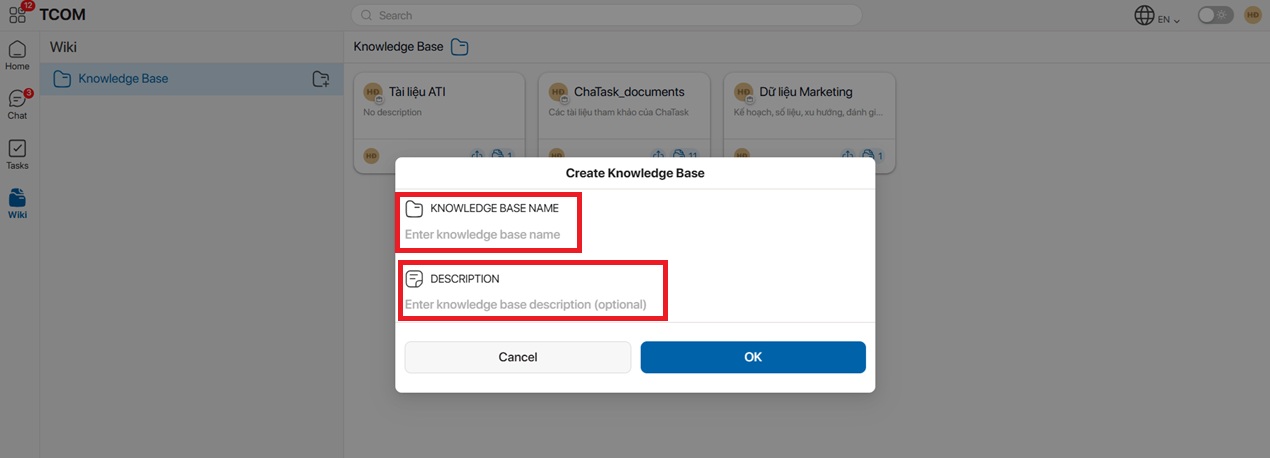
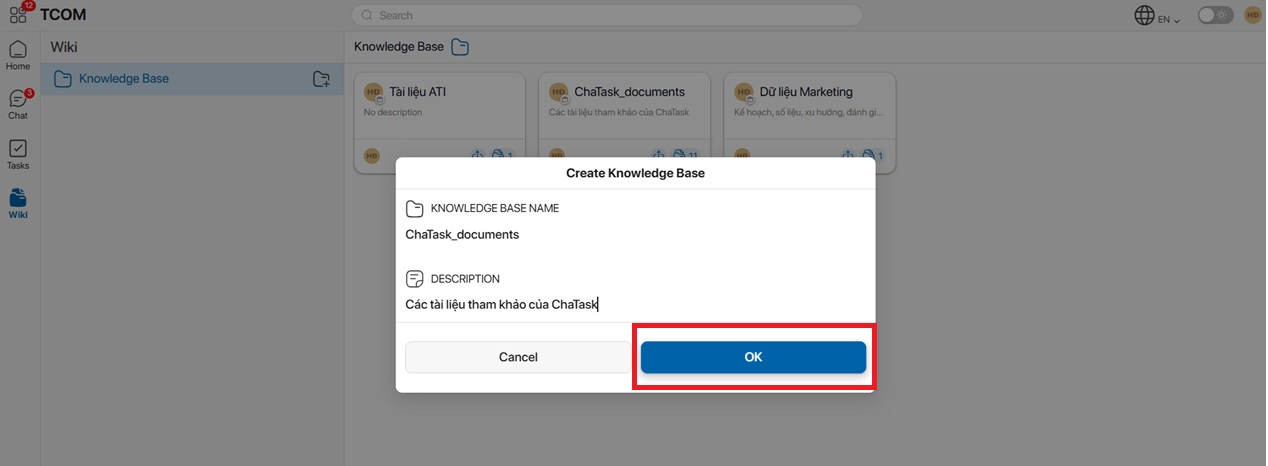
Enter the following information:
-
Knowledge Base Name
-
Knowledge Base Description
Then click OK to complete the creation.
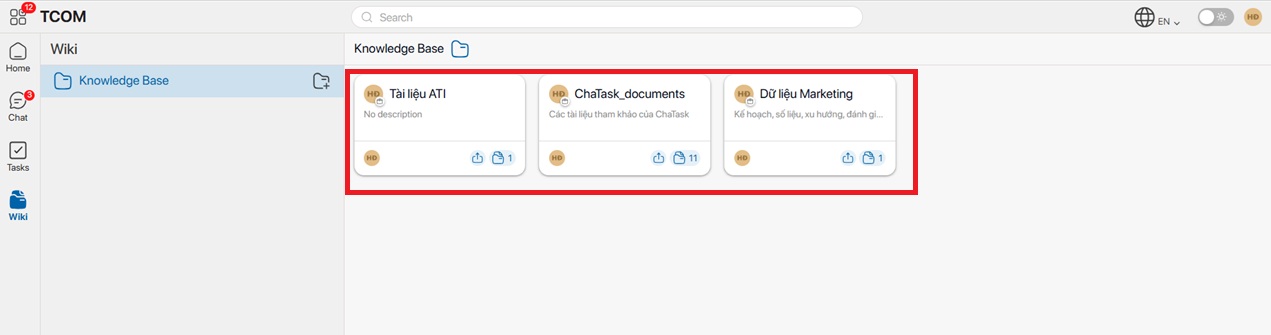
After the Knowledge Base has been successfully created, it will appear in the Wiki list.
Step 3
To add documents to the KB, click the Upload File icon.
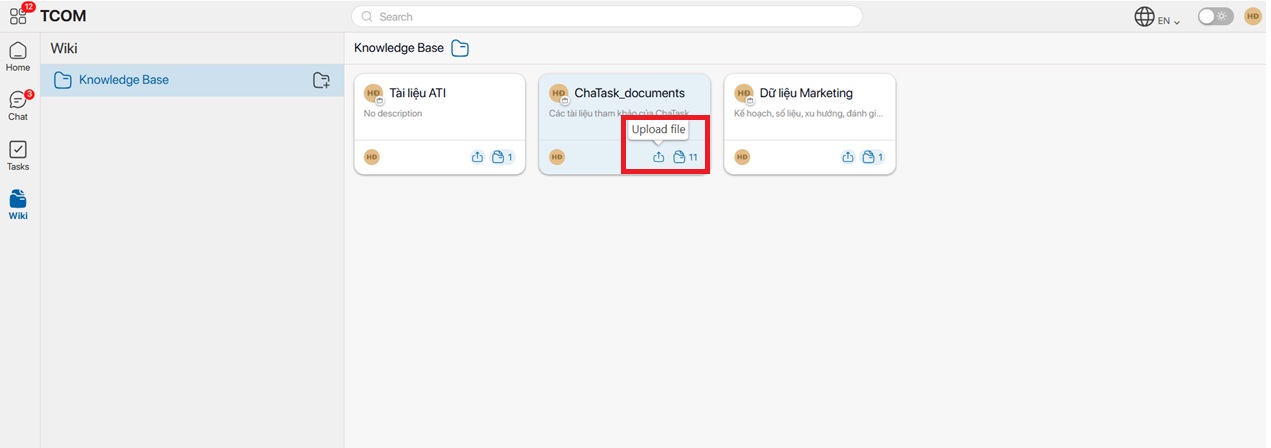
Note:
-
Multiple documents can be uploaded at the same time.
-
The number of documents in the KB will be displayed next to the document icon.
-
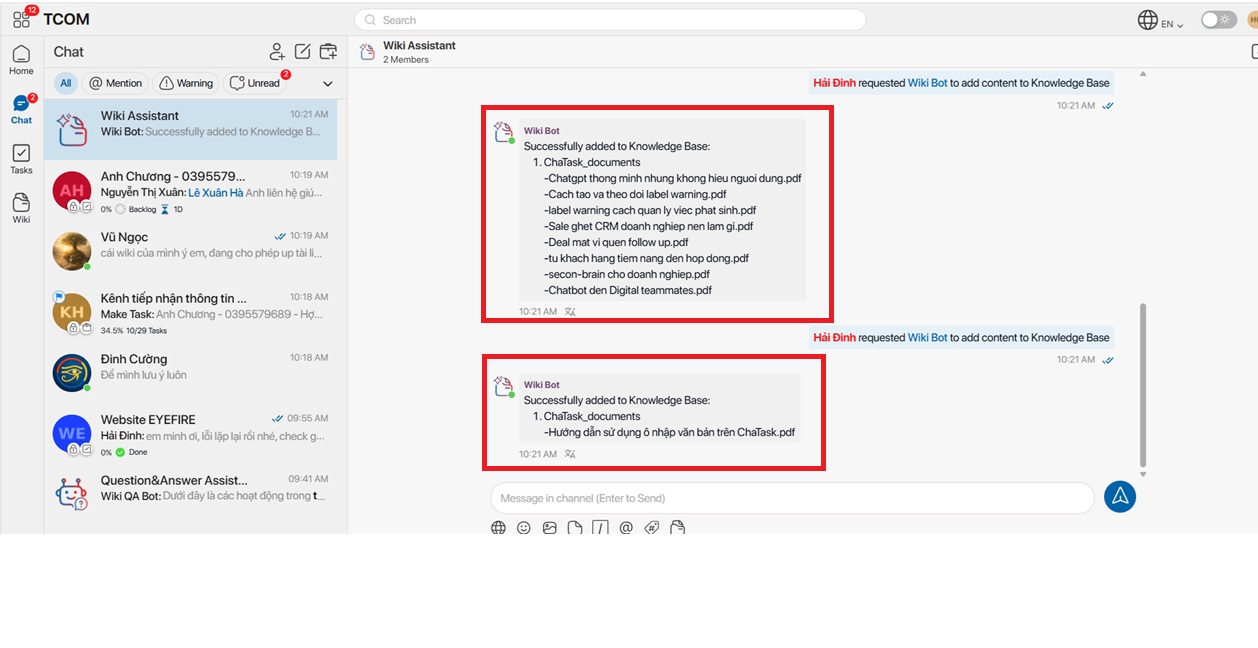
After the documents have been successfully processed, Wiki Assistant will send a notification in the ChaTask conversation.
- Wiki supports uploading documents in the following formats: PDF, DOCX, DOC, XLSX, XLS, CSV, PNG, GIF, JPG, and PPTX.
The documents contained in the KB will be displayed as follows:
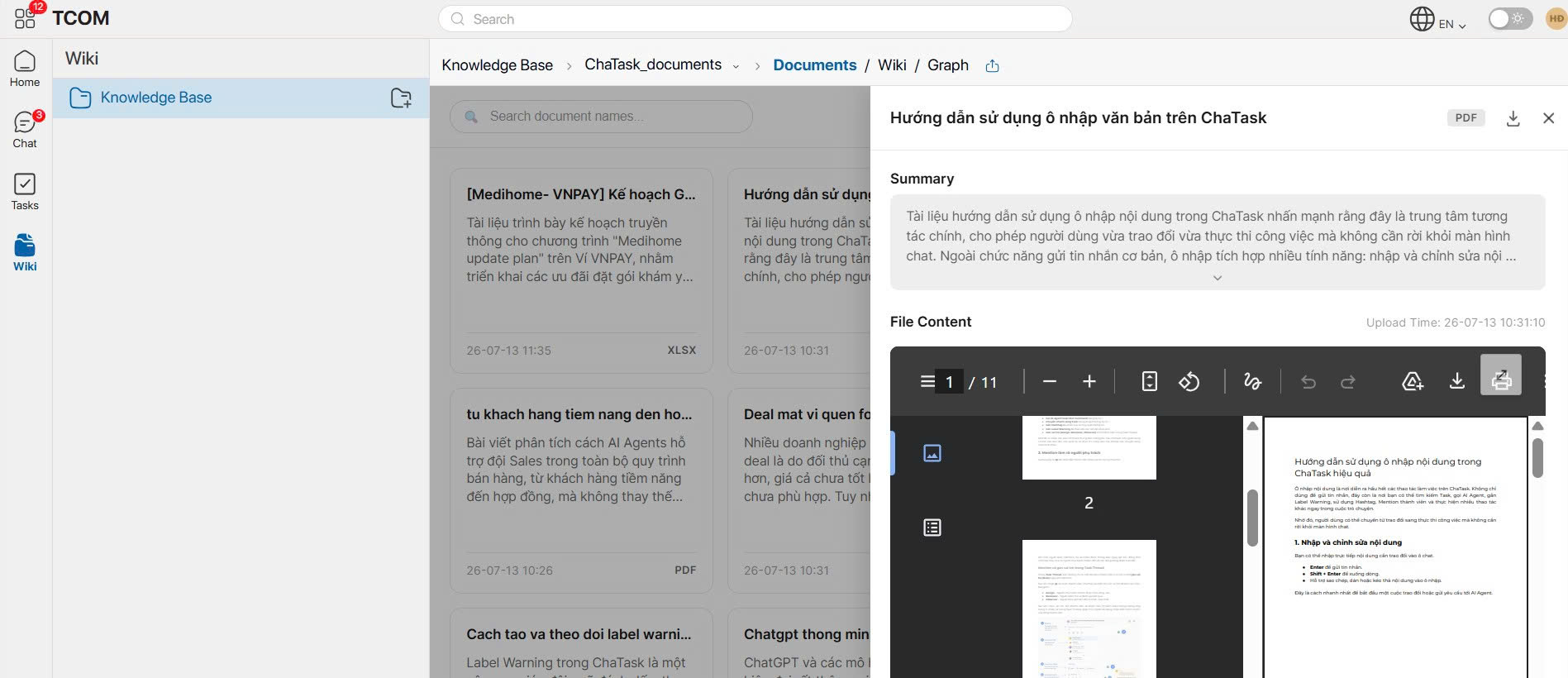
Quick Preview of Documents in Wiki
Users can quickly open and preview documents directly within Wiki, and download any document if needed.
Method 2: Create a Knowledge Base using Wiki Assistant
In addition to creating a Knowledge Base directly from the Wiki menu, users can also use Wiki Assistant to create and manage Knowledge Bases.
Step 1
Open a conversation with Wiki Assistant.
In the message input box:
-
Type "/"
-
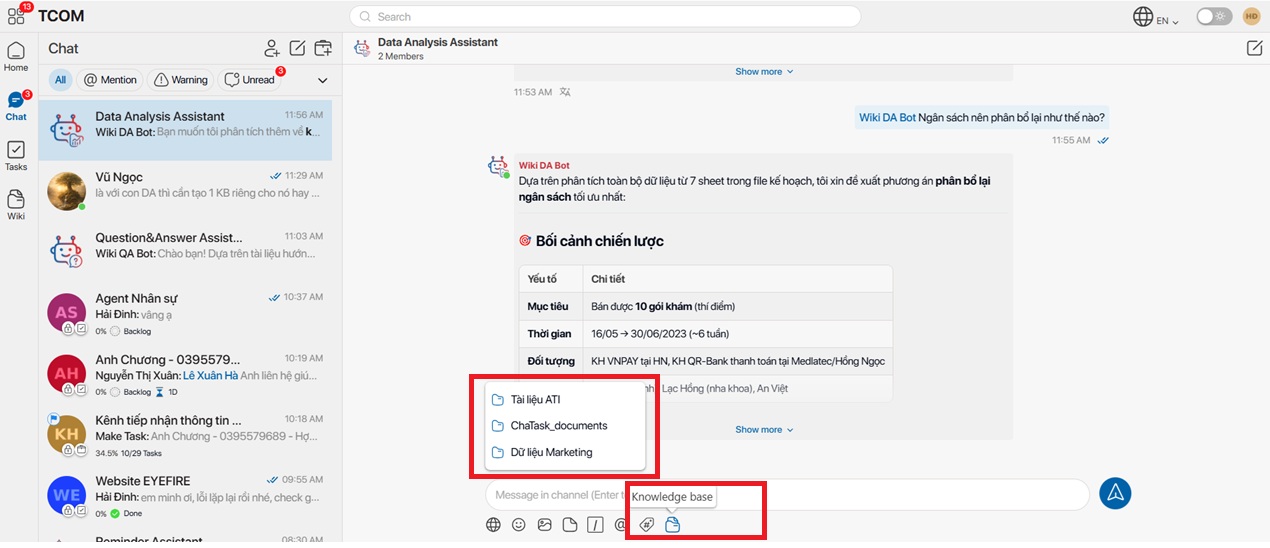
Or click the AI Agent icon below the message input box.
Step 2
Perform the desired action using the corresponding command.
A list of Wiki Commands will appear.
Select the Create Knowledge Base command.
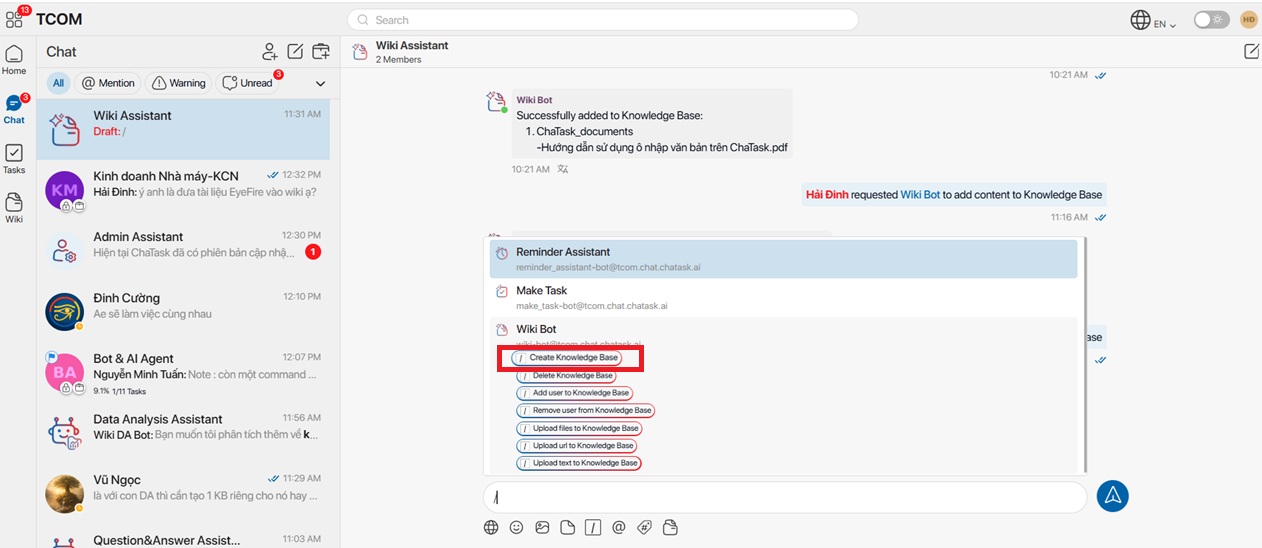
For example, when selecting the Create Knowledge Base command:
A Knowledge Base creation window will appear.
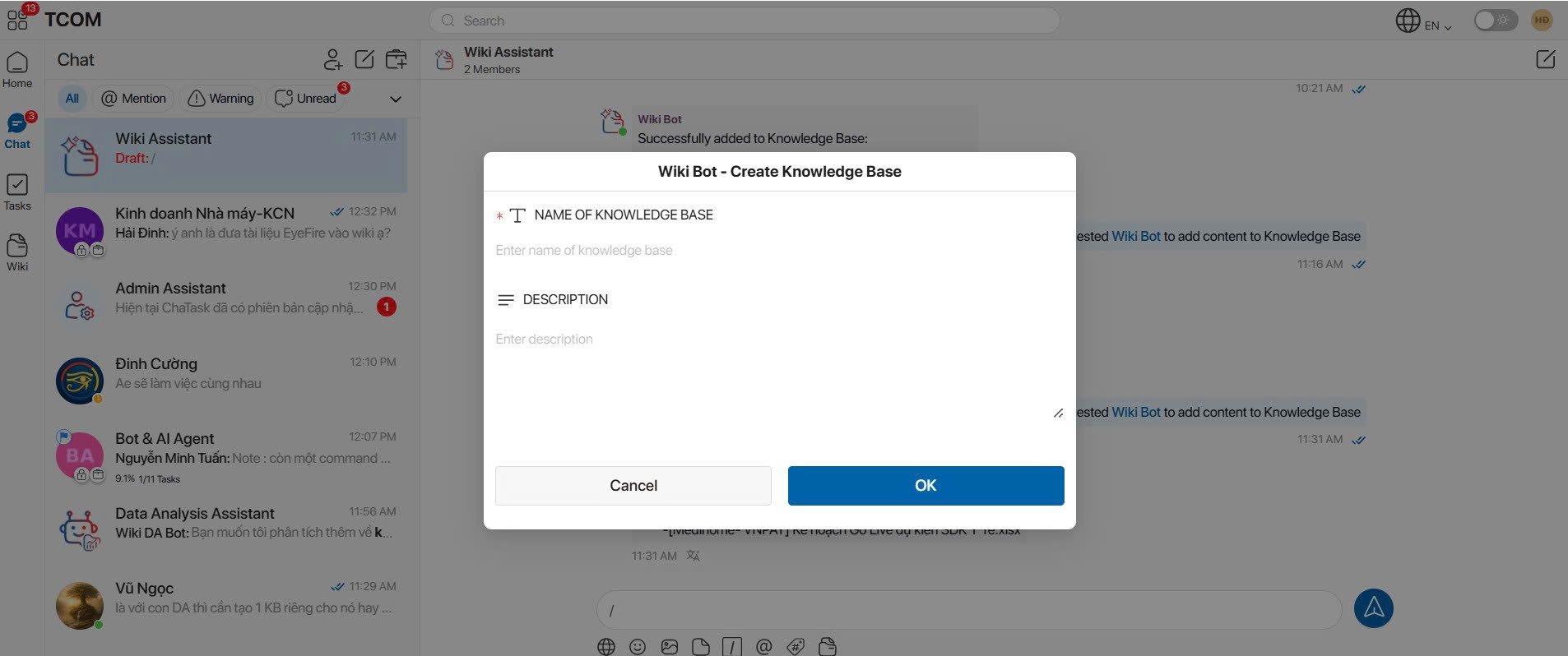
Enter:
-
Knowledge Base Name
-
Knowledge Base Description
Then click OK.
In addition to creating Knowledge Bases, Wiki Assistant also supports many other operations through its Bot Commands.
3. AI Agents in Wiki
Wiki Assistant
Helps users build and manage the enterprise knowledge base.
Main functions:
-
Create Knowledge Bases
-
Add documents
-
Manage documents
-
Add web pages
-
Manage data sources
Wiki QA Bot
Helps users search for information and answer questions based on the enterprise knowledge base.
The bot can:
-
Search information across Knowledge Bases
-
Consolidate information from multiple documents
-
Answer questions using natural language
-
Cite relevant reference sources
Wiki DA Bot
Helps analyze data stored in Knowledge Bases.
Capabilities include:
-
Data analysis
-
Data visualization
-
Trend detection
-
Report and insight generation
4. Search Information Using Wiki QA Bot
Wiki QA Bot allows users to ask questions based on the Knowledge Bases they have permission to access.
Step 1
Open a conversation with Wiki QA Bot.
Click the Knowledge Base icon below the message input box.
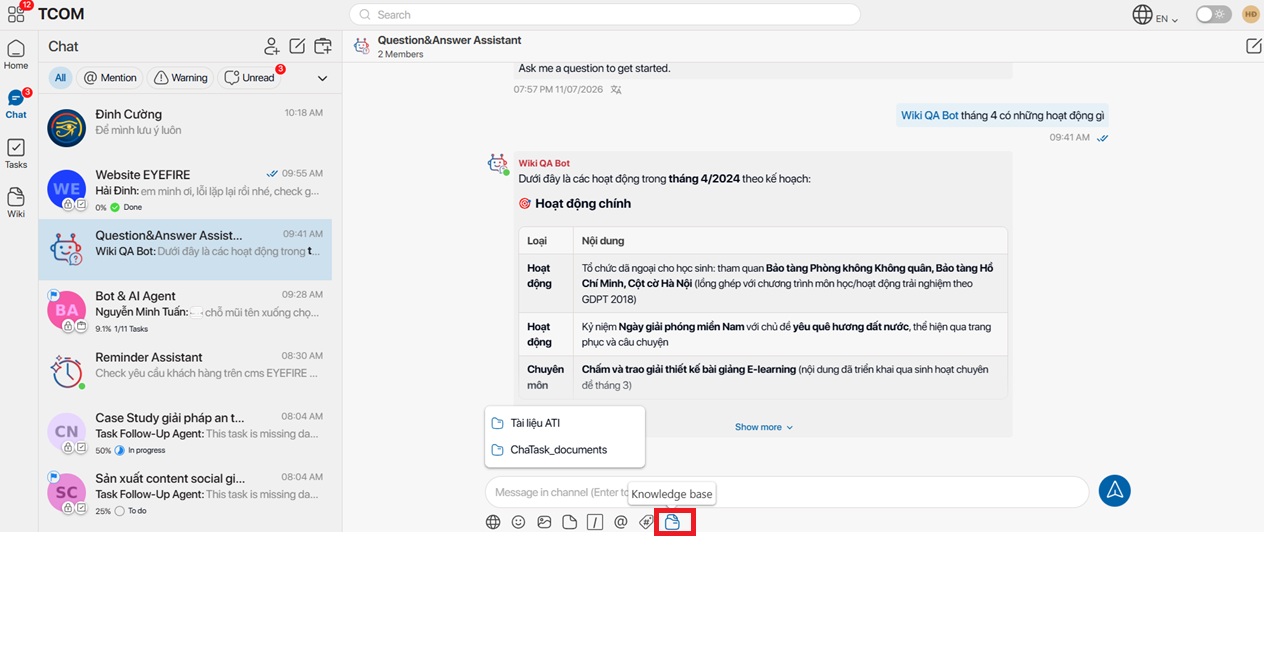
Step 2
Select one or more Knowledge Bases to use as the data source.
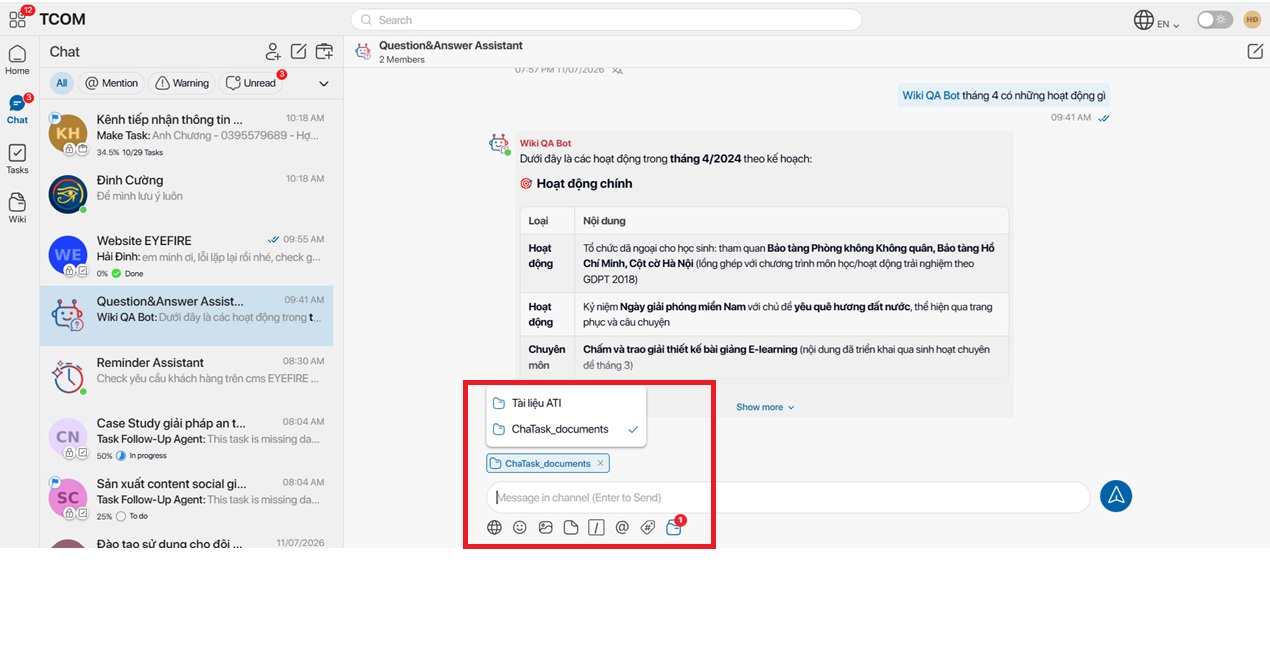
Note: Multiple Knowledge Bases can be selected at the same time.
Step 3
Enter your question in the chat box.
Examples:
-
What are the steps in the leave request process?
-
Where is the overtime policy documented?
-
What is the SOP for operating the packaging machine?
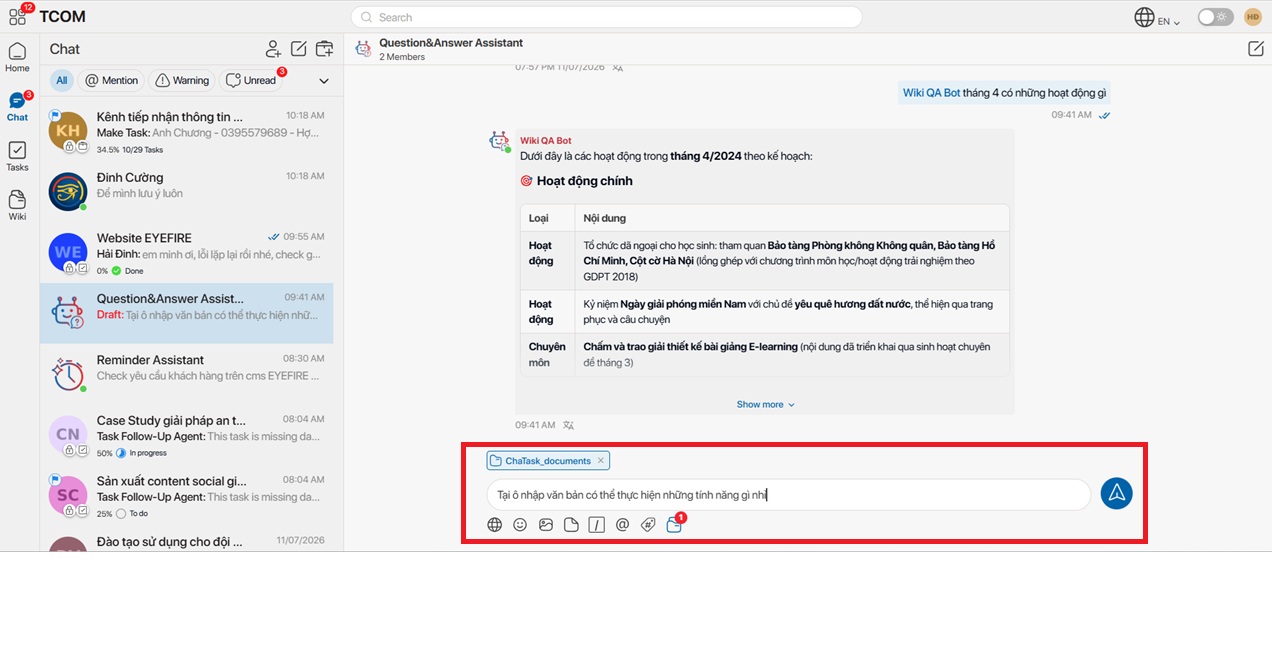
Wiki QA Bot will search the selected Knowledge Bases and return answers based on the contents of the documents.
The response may include:
-
A summarized answer
-
References to relevant documents
-
Source citations
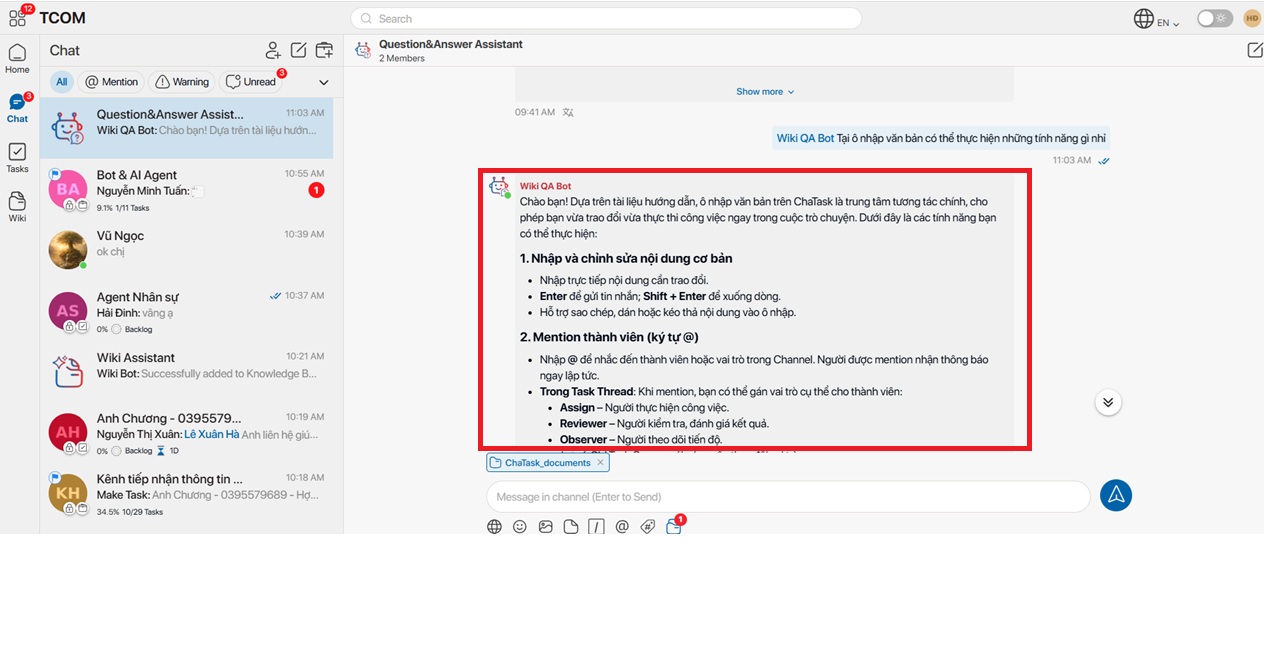
Users can continue asking additional questions to explore information stored in the enterprise knowledge base.
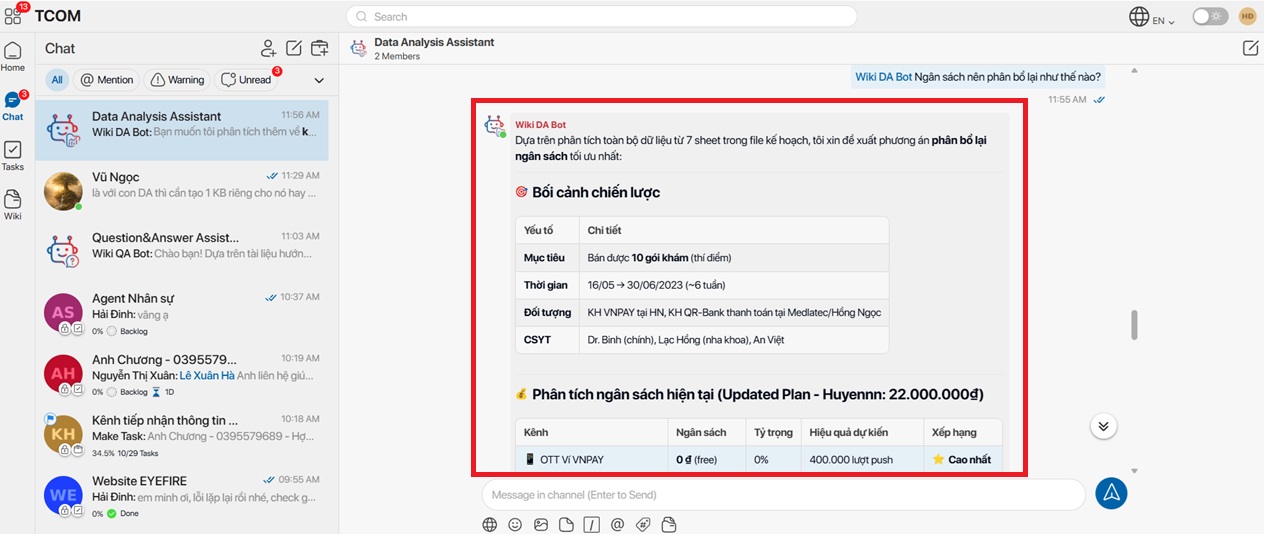
5. Analyze Data Using Wiki DA Bot
Wiki DA Bot helps analyze data from the selected Knowledge Bases.
Step 1
Open a conversation with Wiki DA Bot.
Select the Knowledge Base you want to use as the data source.
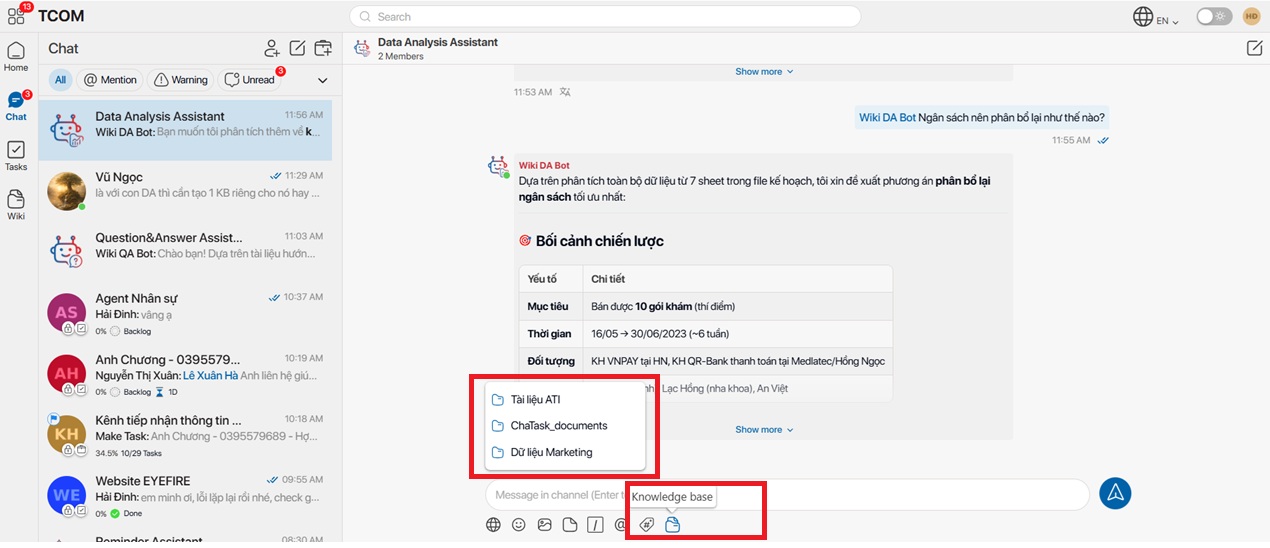
Step 2
Enter your analysis request.
Examples:
-
Analyze monthly revenue.
-
Count employees by department.
-
Summarize project progress.
-
Generate charts from the document data.
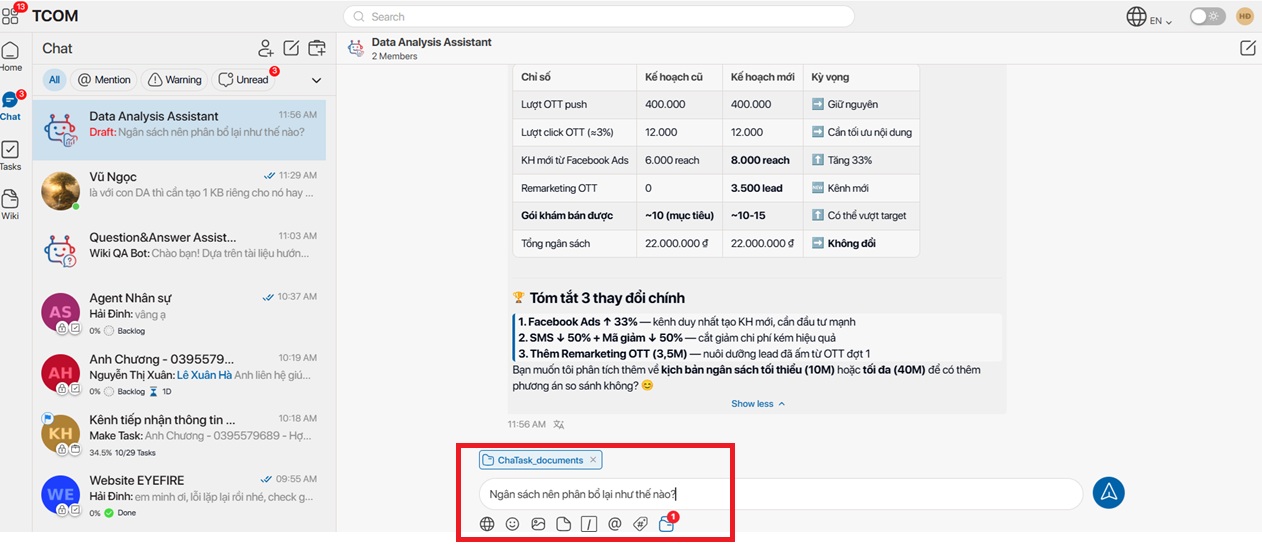
Wiki DA Bot will automatically:
-
Analyze the data
-
Generate statistical tables
-
Visualize the data with charts (when appropriate)
-
Provide findings and insights
6. Notes When Using Wiki
-
Users can only access the Knowledge Bases they have permission to use.
-
Multiple documents can be uploaded in a single operation.
-
A Knowledge Base can contain multiple types of documents.
-
Wiki QA Bot and Wiki DA Bot only use data from the selected Knowledge Bases.
-
The quality of AI-generated responses depends on the quality and content of the documents stored in the selected Knowledge Bases.