1. What is a recruitment process? Why do businesses need to manage the recruitment process?
A recruitment process is a set of steps that a business carries out to search for, evaluate, and select candidates suitable for the position to be filled.
A standard recruitment process includes:
- Identifying hiring needs
- Posting job openings
- Collecting and screening resumes
- Interviewing candidates
- Making hiring decisions
- Onboarding new employees
Each step plays an important role in ensuring the business finds the right person at the right time.
In reality, many businesses, especially SMEs and startups, still manage recruitment in a fragmented and unsystematic way. This leads to a series of problems:
- Inconsistent recruitment: Without a clear process, each hiring round is conducted differently. This reduces evaluation quality and easily leads to mistakes.
- Time and resource consuming: HR has to manually handle hundreds of CVs along with an equal number of candidate messages and interview schedules; this makes the process longer and more costly.
- Poor candidate experience: Candidates who do not receive timely feedback or face a non-transparent process are likely to drop out midway. This directly affects the company’s employer brand.
- Difficulty in tracking and measuring effectiveness: When data is scattered (Email, Excel, SMS, etc.), it becomes very difficult for businesses to track the recruitment pipeline, evaluate the effectiveness of each channel, and optimize the process.
Therefore, managing the recruitment process in a structured way is a mandatory factor if a business wants sustainable growth.
2. What is an effective recruitment process?
An effective recruitment process not only helps businesses hire enough people but also ensures hiring the right people at the right time while optimizing costs.
Below are the key criteria:
- Clear and structured: A good process needs to be standardized with specific steps: who is responsible for each step, how long it takes, and what the evaluation criteria are. This helps the HR team and hiring managers collaborate more effectively.
- Optimized hiring time: The longer the hiring process, the more opportunities are lost for good candidates and the higher the operational costs. An effective process should shorten CV screening time, speed up candidate responses, and automate repetitive steps.
- Improved candidate quality: Hiring more is not better—hiring the right people is. An effective process needs clear screening criteria, data-driven evaluation, and reduced subjectivity.
- Good candidate experience: Candidates today also “choose” companies. HR needs to maintain fast response times, clear communication, and a transparent process. A good experience increases offer acceptance rates and strengthens employer branding.
- Measurable and optimizable: Businesses need to answer questions such as which channels bring the best candidates, which stage causes the most drop-offs, and what the average hiring time is. To achieve this, the recruitment process must have centralized data and clear reporting.
In short, an effective recruitment process is a combination of speed – quality – experience – data.
3. What is ChaTask? Why is ChaTask an effective solution for recruitment process management?
ChaTask is a unified AI Task Management platform that processes and coordinates work directly through chat, strongly supported by AI Agents.
ChaTask is designed to help businesses operate more efficiently in many internal activities, especially recruitment. Instead of using multiple separate tools such as:
- Excel
- Other chat platforms (Zalo, Telegram, Teams, etc.)
- Other task management tools (base.vn, 1office, trello, etc.)
ChaTask allows the entire process to be centralized into a single system, where all information, communication, and work progress are managed clearly and synchronously.
In the context of increasingly complex recruitment, manual management methods are no longer suitable. ChaTask offers a new approach: transforming the recruitment process into a structured system that can be tracked, measured, and continuously optimized.
The strength of ChaTask lies in its structured approach, helping businesses manage recruitment as a system rather than as fragmented tasks.
Each recruitment campaign can be organized into a “Project,” which contains “Tasks” corresponding to major activities such as job posting, CV screening, or interviewing. Each task is then broken down into smaller steps (“Items”) to ensure no work is missed.
This structure provides greater transparency and better control over the entire process. Managers can easily track progress, identify bottlenecks, and make timely adjustments. At the same time, clear division helps team members understand their roles, improving collaboration efficiency.
Not only does ChaTask improve management, but it also enhances productivity. When tasks are systemized and optimized, HR teams no longer need to spend excessive time on manual work. Instead, they can focus on strategic activities such as candidate evaluation or employer branding.
Another advantage of ChaTask is its flexibility across different types of businesses. Whether it is a startup in rapid growth, an SME optimizing costs, or a large organization with complex processes, ChaTask can be implemented and customized according to actual needs.
Overall, ChaTask is not just a recruitment support tool, but a solution that helps businesses transform recruitment process management in a more modern, efficient, and sustainable way.
4. Detailed guide to managing the recruitment process with ChaTask
After understanding the role of a structured recruitment process and how ChaTask can optimize it, the next important question is: how to implement it in practice?
In reality, many businesses have tools but do not fully utilize them due to a lack of proper initial setup. With ChaTask, recruitment management is no longer fragmented but organized into a clear, trackable, and scalable system. From creating recruitment campaigns, assigning tasks to team members, to tracking progress and evaluating candidates, everything can be done on a single platform.
In this section, you will be guided step by step on how to set up and operate a recruitment process using ChaTask, based on the Project – Task – Checklist Items model. This approach helps businesses control the entire process visually, minimize errors, and improve HR team performance.
Watch the sample tutorial video below:
4.1. Create a new “Recruitment” Project in the Project Channel
Purpose: Creating a Project Channel is the first step in managing the recruitment process. You only need to create one Project channel for the entire recruitment process of each new position. Within this project, you can make adjustments, allocate resources, optimize efforts, and make timely and accurate hiring decisions at each stage.
Let’s start with a sample case study—recruiting a Growth MKT Leader for the Marketing department with the following basic requirements:
- Level: Leader
- Salary range: 15 – 25m
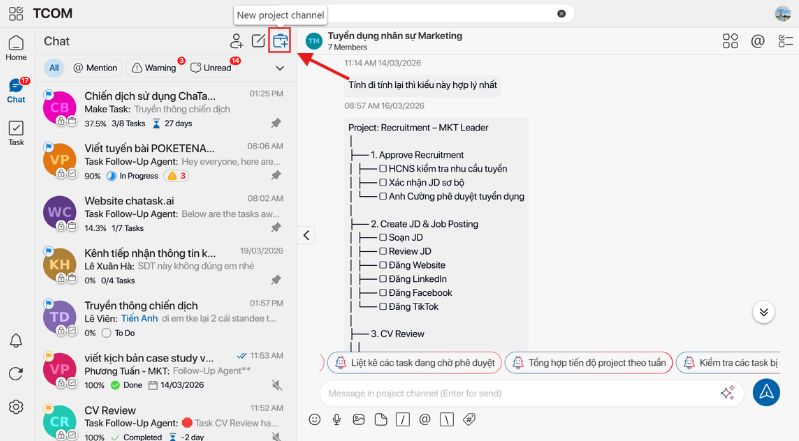
Step 1: Create a new Project Channel (Figure 1.1)
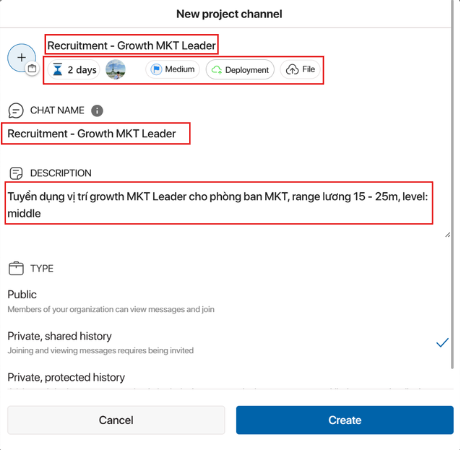
Step 2: Fill in the required Project information (Figure 1.2)
Required information includes:
- Project Name: Recruitment – Growth MKT Leader
- Duration: 2 days
- Participants
- Priority (none / low / medium / high / urgent)
- Phase (planning, analysis / design / development / testing / deployment / maintenance / unassigned)
- Description: Recruiting MKT Leader for Marketing department, salary range 15 – 25m, level: middle
After filling in the required information, click Create to create the Project. A new Project will appear as shown below (Figure 1.3).
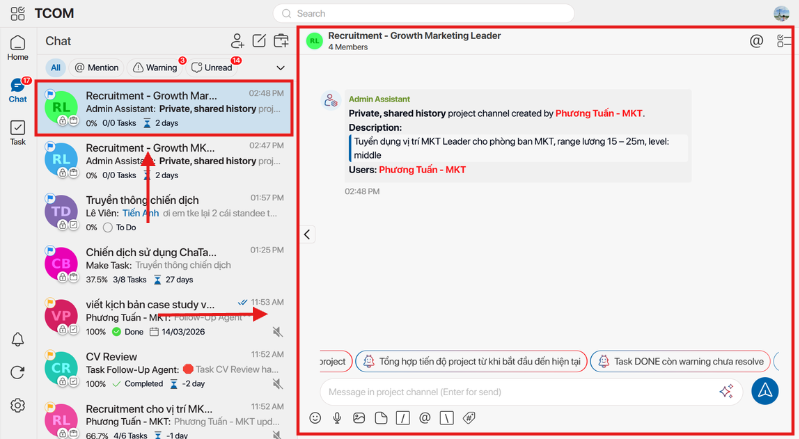
Figure 1.3
The red box on the left is the Chat name, and the red box on the right is the main discussion area of this recruitment Project.
4.2. Create Task Threads and add main Tasks & Items assigned to each Task
Task Thread is the place for discussion and handling of main tasks within the recruitment Project. Task represents the main work items, while Item represents all sub-tasks needed to complete that main task.
In this recruitment process case study, you will have main tasks that need to be completed before the new hire (Growth MKT Leader) officially onboard. The first items HR needs to handle include:
- HR checks recruitment needs
- Confirm preliminary JD
- Send back to the manager (you) for approval
Here, the main Task will be Approve Recruitment, created as follows:
Step 1: Send a message in Task Thread with the main Task name: “Approve Recruitment” (Figure 2.1)
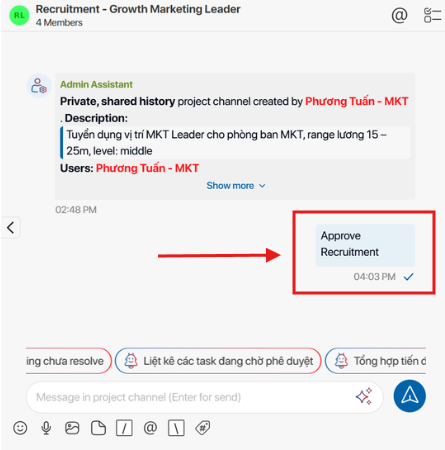
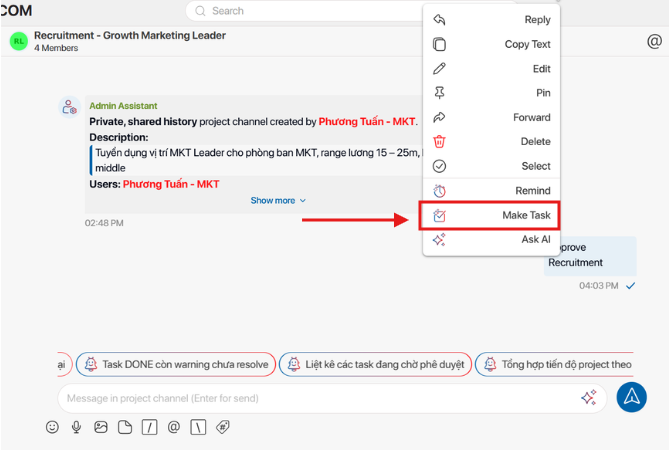
Step 2: Right-click on the text “Approve Recruitment” and select Make Task to create the main task (Figure 2.2).
Step 3: Fill in the necessary information. In the Item section, add the smaller tasks required to complete this main Task (Figure 2.3).
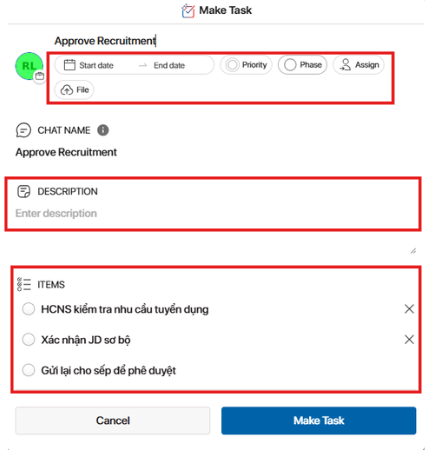
Step 4: Equally important, in the Assign section, assign related members with three main roles (Figure 2.4):
- Assign (main executor)
- Reviewer (person who checks and evaluates results)
- Observer (person who monitors progress)
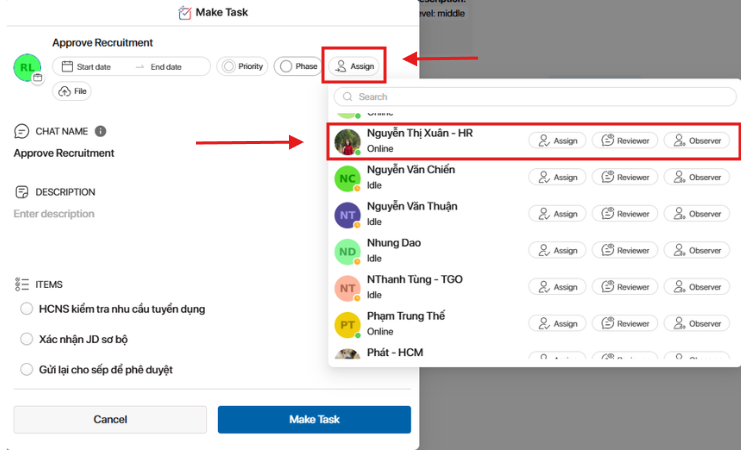
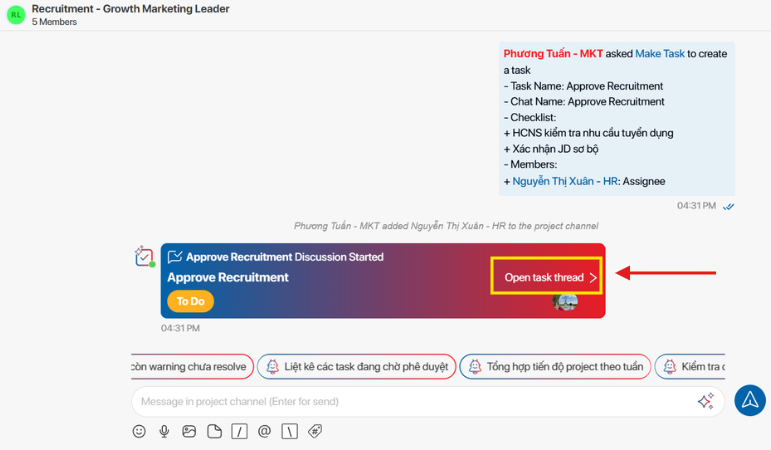
Step 5: After filling in, click Make Task to create the first main Task.
AI Agents will automatically create the Task, and you can click Open Task Thread to access the dedicated discussion area of the Task (Figure 2.5 & Figure 2.6).
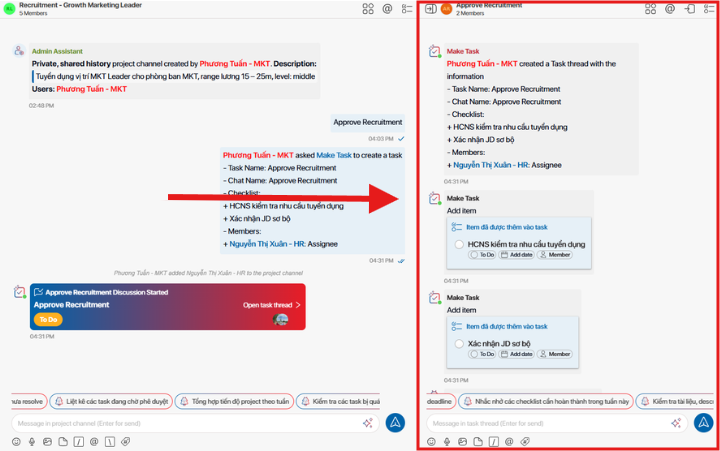
Step 6: Check Items (subtasks to be completed)
Click the icon shown in Figure 2.7 to view Items, then fill in the required information and assign responsible members for each Item (Figure 2.8).
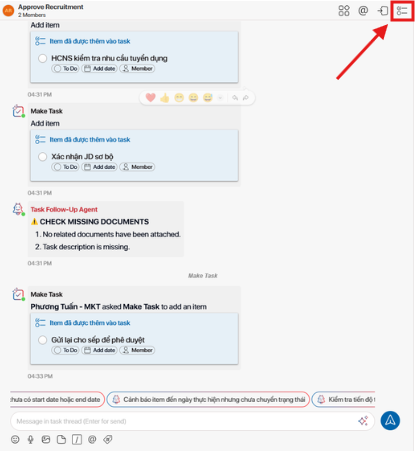
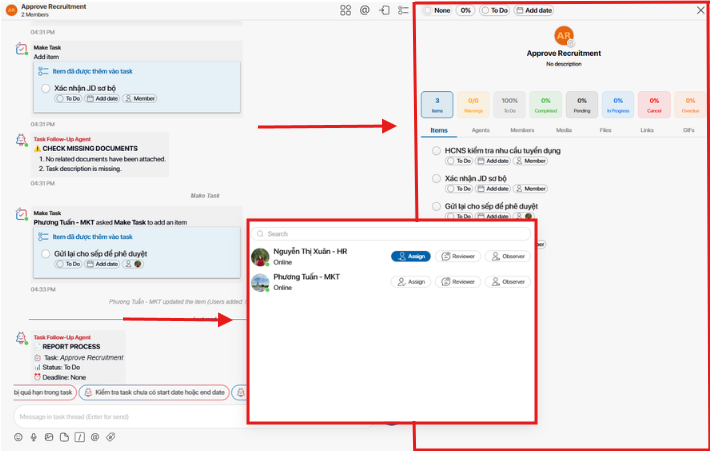
All the steps above form the process of creating a main Task “Approve Recruitment” and adding Items (subtasks) as well as assigning related members.
In addition to the main Task “Approve Recruitment,” there will be subsequent Tasks such as:
Approve Recruitment → Create JD & Job Posting → CV Review → Candidates who pass CV screening will be scheduled for interviews → Candidates who pass interviews will proceed with Offer and Onboarding.
Each main Task will have its own Items and different participants. However, the process of creating Tasks remains similar to the steps above.
Note: Only members added to a Task can view the work content and Items in the Task Thread.
4.3 Actions when staff complete a Task and close the Task
Continuing with the Task “Approve Recruitment,” there are 3 Items required to complete it:
- Item 1: HR checks recruitment needs
- Item 2: Confirm preliminary JD
- Item 3: Send to manager for approval
If HR staff have completed all these tasks, they only need to tick the circle on the left of each Item to confirm completion (Figure 3.1).
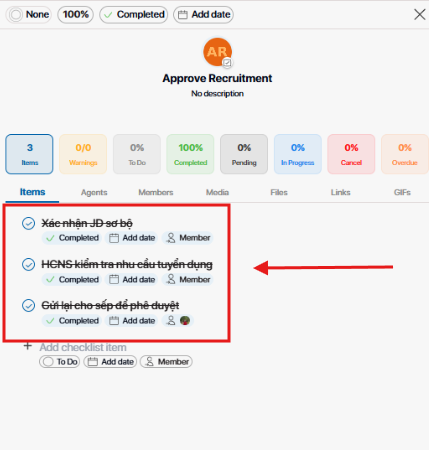
Figure 3.1
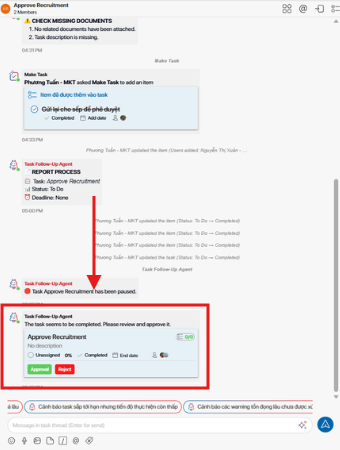
At this point, ChaTask’s AI Agent will automatically notify that the Task has been completed and requires manager approval to close the Task. Click Approval to confirm completion or Reject if there is an issue (Figure 3.2).
ChaTask – An effective solution for recruitment process management
The strength of ChaTask lies in its structured approach, helping businesses manage recruitment as a system rather than fragmented tasks. Each recruitment campaign is organized into a Project, containing Tasks for major activities such as job posting, CV screening, or interviewing. Each Task is further broken down into smaller steps to ensure no work is missed.
This structure provides transparency and better control over the process. Managers can easily track progress, identify bottlenecks, and make timely adjustments. Clear task division also helps team members understand their roles, improving coordination.
ChaTask not only improves management but also enhances productivity. With systemized and optimized workflows, HR teams no longer spend excessive time on manual tasks, allowing them to focus on strategic activities such as candidate evaluation and employer branding.
Another advantage is flexibility across different business types. Whether it is a startup in rapid growth, an SME optimizing costs, or a large organization with complex processes, ChaTask can be implemented and customized accordingly.
Overall, ChaTask is not just a recruitment tool but a solution that helps businesses modernize, optimize, and sustain their recruitment process management.
Don’t let the recruitment process slow down your business growth. Experience ChaTask today to automate, optimize, and upgrade your entire recruitment operation on a single platform.
Read more: Guide to Using Label Warning and Hashtag in Chatask